The most common distractions in the workplace are interruptions from coworkers, chat and email notifications, meetings that split the day into short gaps, overheard calls and conversations, people moving past desks, personal phones, and competing requests with no clear priority. In a shared office, interruptions and understandable speech cost the most, because they force people to drop a task and rebuild it later. Reduce them in this order: agree team rules for interruptions and reply times, protect focus time in the calendar, change the layout so calls and focus work are not side by side, and add enclosed space only for the tasks that still cannot stay in the open.
Last Updated: November 11, 2026 | Author: Richard

Common distractions in the workplace, with examples
Distraction complaints in an office can be sorted into eight groups. Sorting them by who can fix them saves time: a manager can change a meeting habit this week, while moving a call-heavy team needs facilities, a floor plan, and usually a budget.
| Distraction | Typical example | Who can fix it | First fix to try |
|---|---|---|---|
| Interruptions from coworkers | “Got a minute?” questions, desk drop-ins, shoulder taps | Team and manager | Agree which questions can wait and how people signal focus time |
| Chat and email notifications | Group chat pings, @mentions, email alerts during focused work | Team | Set reply-time expectations per channel and mute non-urgent channels during focus blocks |
| Meetings | 30-minute gaps between calls, recurring status meetings | Manager | Hold team-wide meeting-free blocks and move status updates to writing |
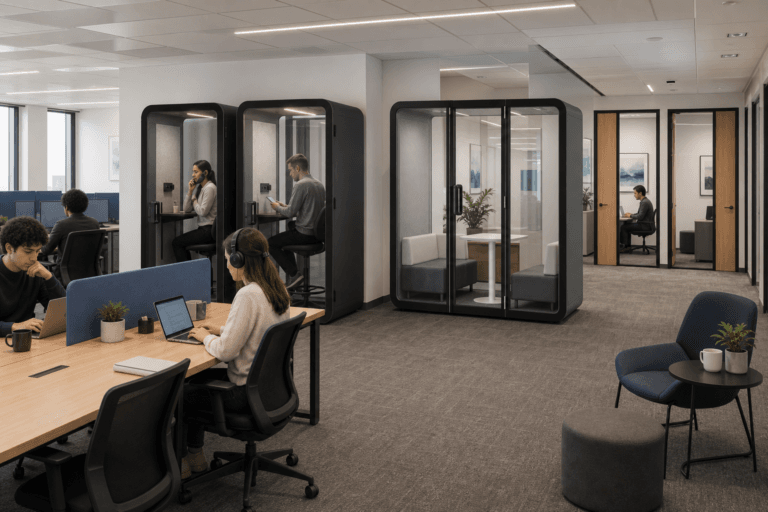
| Overheard speech | Sales or support calls at desks, video meetings in the open, side conversations | Facilities and team | Move calls and long conversations away from focus seating |
| Visual movement | Walkways beside desks, traffic to the kitchen or printer | Facilities | Route circulation away from focus seats and turn desks away from main paths |
| Personal phones | Social media and personal messages during work blocks | Individual | Keep phones out of sight during focus blocks |
| Unclear priorities | Several people asking for “urgent” work at once | Manager | Name one owner for incoming requests and publish the week’s priorities |
| Workspace friction | No free room for a call, hunting for a quiet seat, slow equipment | Facilities and IT | Count how often people search for a room or quiet seat and close the most frequent gap |
The first four rows are the ones a team changes together, and they feed each other. A team that expects instant chat replies walks over to ask when a reply is slow. A team with nowhere to take calls takes them at desks, which pushes everyone else into headphones and chat. Personal habits such as phone use and task planning are better handled one person at a time; our guide on how to stay focused at work covers them.
What constant interruptions cost a team
The cost of a distraction is rarely the minute it takes. It is the work that has to be picked up again, the pressure of catching up, and the conversations that move to channels where they create even more pings.
Three findings show the scale:
- Interruptions are constant in digital work. Microsoft’s Work Trend Index found that employees using Microsoft 365 receive a meeting, email, or chat ping about every two minutes across an eight-hour workday, or 275 pings when counted over the full 24 hours. The average worker in the data receives 117 emails a day and 153 Teams messages per weekday. The figures come from aggregated Microsoft 365 signals through February 15, 2025 (Microsoft WorkLab, June 2025).
- Interrupted people work faster and feel worse. In a controlled study with 48 participants answering work emails, those who were interrupted finished slightly sooner than those who were not, with similar quality, but reported significantly higher stress, frustration, and effort (Mark, Gudith and Klocke, CHI 2008). The cost shows up as workload before it shows up as missed deadlines.
- Removing boundaries can reduce conversation. When two corporate headquarters moved to more open layouts, face-to-face interaction fell by about 70% while email and instant messaging rose (Bernstein and Turban, Philosophical Transactions of the Royal Society B, 2018). The authors read this as people withdrawing from officemates and moving conversations to email and chat, which adds to the notification load in the table above.
A manager can spot the same pattern without a productivity study: meeting rooms booked by one person for a call, people asking to work from home on days they need to concentrate, sensitive conversations moved to stairwells, and chat threads that exist only because nobody wants to talk at their desk.
Why overheard speech is the hardest distraction to fix with rules
Rules work for interruptions and notifications because people control when they send them. Speech is different. A person on a sales call cannot speak quietly enough to stop colleagues following the conversation, and asking a support team to keep their voices down asks them to stop doing their job.
Speech distracts because it can be understood. A steady hum is easy to tune out; a sentence you can follow is not. Open-plan office acoustics measure this directly. ISO 3382-3 defines the distraction distance as the distance from a talker at which the speech transmission index falls below 0.50; inside that radius, speech is intelligible enough to pull attention away. A field analysis of 21 open-plan offices found that each additional meter of distraction distance raised the odds of employees reporting high disturbance from colleagues’ speech by roughly 10 to 15% (Haapakangas and colleagues, Journal of the Acoustical Society of America, 2017).
For a team plan, this means seating and distance decide more than etiquette. A call-heavy team placed next to analysts will distract them whatever the rules say. It also explains why a common first fix falls short. Buyers who contact B&H Ergonomics have often tried desk screens first: the screens block sight lines, but understandable speech and repeated movement remain. If the problem extends to echo, equipment noise, or sound masking, follow our source-by-source plan to reduce noise in an open office.
How to reduce distractions in the workplace: a team plan
Work through these steps in order. Each step costs less than the next, and the log from step 1 tells you whether you need the later ones.
1. Log distractions for one working week
Ask everyone on the team to note, for five working days, each time something pulls them off a task. A shared sheet with five columns is enough:
| Column | What to record | Example |
|---|---|---|
| Time | When it happened | Tue 10:40 |
| Source | One of the eight groups above | Overheard speech |
| Location | Where the person was sitting | Desk row C, next to sales |
| Task interrupted | What the person was working on | Budget review |
| Could it have waited? | Yes or no | Yes |
At the end of the week, count entries by source and by location. If most entries are interruptions that could have waited, start with steps 2 to 4. If entries cluster around one part of the floor, start with step 5.
2. Set reply-time expectations by channel
Many interruptions happen because nobody knows how fast a reply is expected, so people ask in person or ping several channels at once. Agree a short rule set, for example:
- Urgent and blocking: phone call or in person.
- Needed today: direct chat message.
- Can wait a day: email or a thread in the team channel.
Add one visible focus signal that the team agrees on, such as a status message or a calendar block, and have managers respect it first. A rule the team lead ignores becomes a rule nobody follows.
3. Protect shared focus time in the calendar
Individual focus blocks get booked over. Team-wide meeting-free windows, such as two mornings a week, hold up better because nobody inside the team can schedule into them. Keep recurring status meetings outside those windows.
4. Cut meetings that only share information
Review the team’s recurring meetings. Keep the ones that need a decision or a real discussion, move status updates to writing, and shorten the rest so that the day keeps at least one long block free. A day with two 90-minute gaps leaves twice as many free minutes as one with six 15-minute gaps, in blocks long enough to finish something.
5. Change the layout before buying anything
Use the location column from the log. The fixes that come up most often:
- Seat call-heavy roles such as sales, support, and recruiting together, away from roles that need long focus.
- Move focus seating away from kitchens, printers, entrances, and main walkways.
- Turn desks so focus seats do not face the main circulation path.
- Mark a quiet zone and keep calls and video meetings out of it.
Repeat the log for a week after each change and compare the counts by source. A drop in the targeted source shows the change worked; no change points to the next step.
When an enclosed space is the right fix
Add enclosed space when the log points to tasks that cannot stay in the open, not because the office feels noisy in general. The usual signs:
- With team rules in place, overheard calls and conversations are still the largest source in the log.
- Meeting rooms are regularly booked by one person for a call or video meeting.
- HR, finance, recruiting, or managers move sensitive conversations to stairwells, cars, or empty rooms.
- People ask to work from home on the days they need to concentrate.
Match the space to the task, not to headcount:
| Task that needs enclosure | Space that fits | What it changes |
|---|---|---|
| One-person calls and video meetings | Office phone booth | Takes speech out of the desk area and frees meeting rooms |
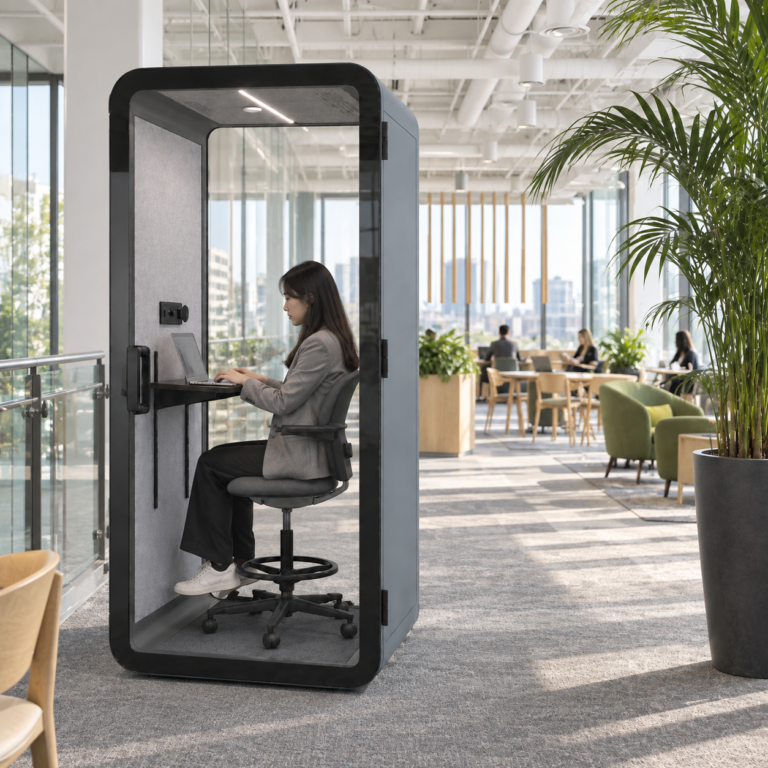
| Long focus sessions | Work pod | Gives one person a closed seat for laptop work away from speech and walkways |
| Conversations with two to four people | Meeting pod or small room | Keeps small meetings out of large conference rooms |
Office pods add this space without building new walls. For the speech problem described above, the relevant measure is how much a complete pod reduces speech level. Elite-S achieved ISO 23351-1 Class A acoustic performance with 33 dB speech level reduction. In B&H office testing under controlled conditions, Elite-S showed a 40-45 dB sound level difference.
Compare acoustic office pods for calls, focus work, and small meetings, or go straight to office phone booths if calls are the largest source in your log. For how many enclosed spaces each department usually needs, see commercial office space planning with office pods. When you ask B&H Ergonomics for a quote, include the log summary: the main distraction sources, the number of daily calls, the teams involved, and the floor area available.
FAQ
How can managers reduce interruptions without stopping collaboration?
Separate when and where collaboration happens rather than discouraging it. Keep quick questions for set times or a team thread, protect shared focus windows, and give conversations a place away from focus seating. People collaborate more freely when talking does not mean disturbing the next desk.
Are open offices more distracting than private offices?
Open layouts let speech and movement reach more desks, so more people are affected by each call or conversation. How distracting a specific open office is depends on seating, distraction distance, and whether calls and private talks have somewhere to go. An open office with zoned seating and enough enclosed space can work well for teams that collaborate often.
How do you measure distractions in the workplace?
Start with a one-week team log that records the source, location, and interrupted task for each distraction. For speech, an acoustic consultant can measure the office to ISO 3382-3, which reports the distraction distance and the speech level at 4 meters from a talker. Repeat the log after each change to see which fix worked.