
Quick Answer
An office pod maintenance checklist should cover usage-based hygiene cleaning, a weekly function check, a monthly inspection of doors, seals, ventilation, and hardware, and a scheduled warranty and service review. High usage can require more frequent cleaning, but it does not automatically shorten the inspection or replacement intervals for structural, electrical, lighting, control, or fan components. Clean the fan outlet inside the pod with a simple wipe in normal conditions; request service when a fan, power module, light, door, or control stops working or shows damage.
Last Updated: August 26, 2026 | Author: Richard | Estimated Reading Time: 9 minutes
What Office Pod Maintenance Should Cover
Office pods include phone booths, focus pods, work pods, meeting pods, and other enclosed workplace pods. Their maintenance plan should keep four things reliable:
- Hygiene: The next user should find clean touchpoints, work surfaces, and seating.
- Daily function: Doors, lighting, power, controls, and ventilation should operate as intended.
- Physical condition: Seals, hinges, panels, handles, furniture, and fasteners should remain secure.
- Service control: Facilities staff should know what to clean, what to record, and when to request parts or professional support.
If you are still selecting a pod type or planning a pod program, review the B&H Ergonomics office pods collection. This checklist starts after the pod is installed and in use.
Office Pod Maintenance Schedule
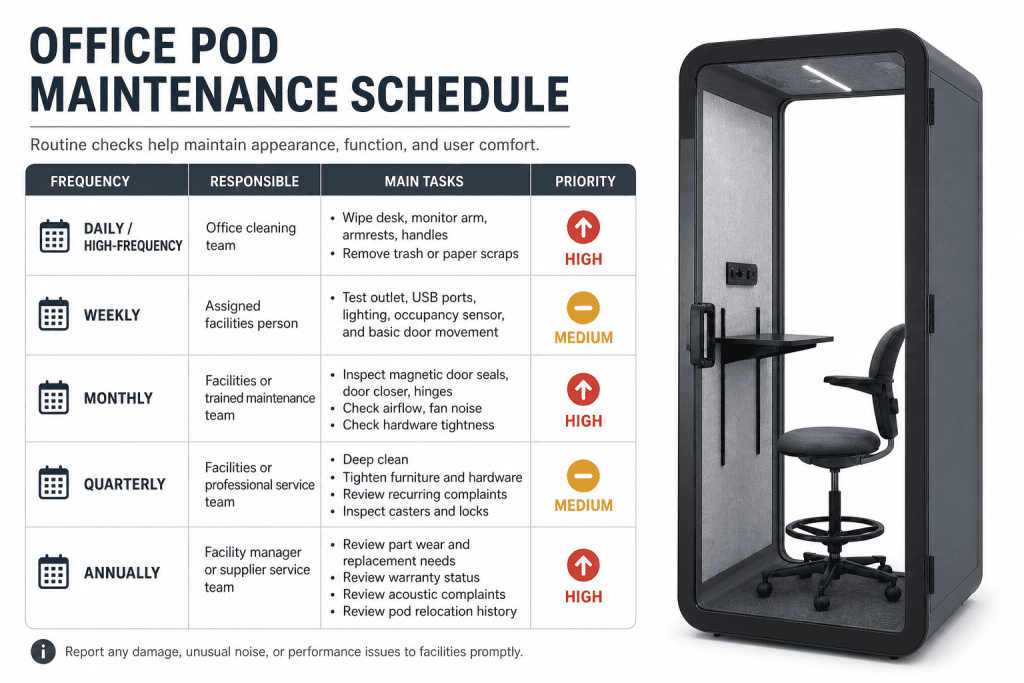
Use the following schedule as a baseline for all office pod types. Change the hygiene frequency when usage, spills, or workplace policy requires it. Keep the other inspection intervals on the baseline schedule unless a fault, relocation, installation issue, or product-specific instruction calls for earlier attention.
| Frequency | Main owner | Tasks | Can high usage shorten it? |
|---|---|---|---|
| After use or daily as needed | Cleaning team or pod user | Wipe work surfaces, handles, armrests, switches, and visible touchpoints; remove waste; report spills or damage | Yes, hygiene only |
| Weekly | Assigned facilities person | Test door movement, lighting, controls, power ports, sensors if fitted, and fan start-up | No automatic change because of usage |
| Monthly | Facilities or trained maintenance team | Inspect door closure, magnetic or compression seals, hinges, panels, furniture hardware, and the fan outlet | No automatic change because of usage |
| Quarterly | Facilities lead | Review the maintenance log, recurring complaints, loose hardware, visible wear, and unresolved service requests | No automatic change because of usage |
| Annually and before warranty decisions | Facility manager or supplier service team | Review component condition, warranty dates, replacement needs, and any relocation or modification history | No automatic change because of usage |
Record the date, person responsible, result, and next action for every non-routine issue. A short log is more useful than relying on memory when several pods share the same floor.
Daily or Usage-Based Hygiene Cleaning
Cleaning is the one part of the schedule that should respond directly to usage. A pod used continuously by a shared team may need touchpoints cleaned between users, while a lightly used pod may only need a daily check. The standard is readiness for the next user, not a fixed number of wipes.
Office Pod Cleaning Checklist
- Wipe the desk, shelf, or other work surface.
- Wipe door handles, push plates, switches, control panels, and other shared touchpoints.
- Wipe chair armrests and any supplied work-support surfaces.
- Remove cups, paper, tissues, and other waste.
- Check for visible spills, stains, dust, or odor.
- Check the floor for debris that could interfere with the door or casters.
- Report damage, loose parts, or a persistent odor instead of leaving it for the next user.
Use a soft cloth and a cleaner approved for the pod’s finishes. Apply liquid to the cloth rather than spraying directly toward outlets, USB ports, switches, sensors, fans, or lighting. Do not saturate upholstered, timber, or electrical surfaces. The U.S. Centers for Disease Control and Prevention recommends regular cleaning of high-touch surfaces and cleaning visibly dirty surfaces when needed; apply that principle to the pod’s actual touchpoints rather than treating every component as a high-frequency service item. CDC cleaning guidance
Hygiene cleaning is not the same as component replacement. Fingerprints or dust do not justify replacing a door seal, fan, light, or control panel when the part is still operating correctly.
Weekly Function Check
The weekly check confirms that the pod remains usable as a workplace, not just presentable. Test one pod at a time and record a clear pass, fail, or follow-up action. When a check fails, use the office phone booth troubleshooting guide to describe the symptom and distinguish routine observations from work requiring qualified service. Include the pod ID, the conditions in which the fault appears, and who is responsible for the next action.
| Item | Check | Escalate when |
|---|---|---|
| Door movement | Open and close the door slowly; confirm it moves without rubbing or sticking | The door drags, will not close, or needs force |
| Door closure | Confirm the latch, magnet, or compression seal engages as designed | The door reopens, leaves a visible gap, or closure is inconsistent |
| Lighting | Turn the light on and observe for stable output | The light flickers, fails to start, or control response is abnormal |
| Power and USB ports | Test with a known-good device or approved tester | A port is dead, loose, hot, or intermittently connected |
| Control panel or switch | Operate the supplied controls once | A button sticks, does not respond, or behaves unpredictably |
| Occupancy sensor, if fitted | Enter and exit once to confirm the expected response | The sensor is delayed, permanently on, or fails to trigger the pod function |
| Ventilation start | Confirm the fan starts when the pod’s control or occupancy logic calls for it | There is no start, unusual noise, vibration, or a clear loss of airflow |
Do not open an electrical module or attempt internal wiring repairs during a routine facilities check. Isolate the pod from use and request qualified service when the problem involves heat, exposed wiring, burning odor, repeated power failure, or a damaged power component.
Monthly Door, Seal, and Structural Check
Monthly office pod door seal maintenance is a visual and functional inspection, not a reason to dismantle the door. Check the full perimeter of the door and the points where users apply force.
- Look for a seal that is detached, compressed, torn, or folded.
- Confirm that the door closes without being lifted, slammed, or held in position.
- Inspect hinges, handles, latches, and visible fasteners for looseness.
- Check panels, trim, desk supports, shelves, and chair mounts for movement or damage.
- Check any supplied casters or leveling feet after a move or layout change.
- Record recurring rubbing, rattling, or visible gaps with a photo and pod number.
Do not substitute generic weather stripping, drill new holes, or alter a panel to solve a closure or privacy complaint without supplier approval. An unauthorized modification can create a fit problem and can also affect warranty eligibility.
Ventilation Fan Care
For normal office pod conditions, ventilation fan maintenance is simple: clean the air outlet inside the pod with a soft, dry or lightly damp cloth. Remove surface dust from the grille and surrounding area, then confirm that the fan starts normally.
You do not normally need to remove the fan, open the housing, lubricate the motor, or perform a complex repair as part of routine cleaning. Do not insert tools or liquid into the grille. If the fan remains noisy, vibrates, fails to start, or airflow is clearly reduced after the outlet is wiped, stop treating it as a cleaning task and request supplier or qualified service support.
When logging a ventilation issue, record:
- Pod identification and location.
- Date and operating condition when the issue occurred.
- Whether the fan starts at all.
- Whether the sound is new, intermittent, or constant.
- Whether the issue remains after the outlet is wiped.
- Any recent relocation, installation change, or unauthorized modification.
This information helps the service team distinguish a dusty outlet from a component fault without asking facilities staff to perform unsafe disassembly.
Warranty Periods for Office Pod Components
Use the following warranty schedule when deciding whether to request a replacement part or service review. These periods apply to the component categories provided for this office pod maintenance guide; the order documentation and applicable B&H warranty terms control for a specific installation.
| Component | Warranty period |
|---|---|
| Structural components | 3 years |
| Switches and control panels | 3 years |
| Ventilation fans | 2 years |
| Electrical components | 1 year |
| LED lighting | 1 year |
Warranty duration is not a maintenance interval. A component does not need to be replaced when its warranty period ends if it remains safe and functional. Conversely, a part that fails during its coverage period still needs a documented service request; routine cleaning does not extend or restart the warranty term.
Before contacting support, attach the pod or component identifier, installation date if known, a short description of the fault, and photos or video when they show the issue. Keep the maintenance log and installation records with the request.
What the Warranty Does Not Cover
The warranty does not cover:
- Improper installation.
- Unauthorized modifications.
- Misuse or abuse.
- Damage during on-site handling after delivery.
- Normal wear and tear.
- Failure to follow installation or maintenance instructions.
These exclusions are why the maintenance log should record moves, modifications, reported damage, and the routine care performed. Do not describe normal wear as a component defect, and do not make a repair that changes the pod before the supplier has reviewed the issue.
When to Clean, Adjust, Replace, or Request Support
Use this decision table to separate routine care from service work. A cleaning issue or a replaceable component fault does not, by itself, justify replacing the whole enclosure. When the decision extends beyond routine maintenance, review whether to keep, repair, relocate, or replace office furniture based on its condition, the work required, and its next intended use.
| Observation | Immediate action | Next step |
|---|---|---|
| Dust, fingerprints, crumbs, or a visible spill | Clean the affected surface using the approved method | Recheck readiness; no part replacement if function is normal |
| Fan grille has surface dust but the fan starts and sounds normal | Wipe the outlet and surrounding grille | Record only if the issue recurs |
| Door rubs, fails to close, or shows a displaced seal | Take the pod out of normal use if closure or safety is affected | Request inspection; do not improvise a seal or drill new holes |
| Light, switch, control, outlet, or USB port fails | Stop using the failed function and record the fault | Request the appropriate service or replacement part |
| Exposed wiring, burning odor, heat, sparking, or liquid near power | Stop use and isolate the pod | Escalate immediately to qualified service personnel |
| Cosmetic wear with normal operation | Document it in the log | Handle through planned refurbishment or replacement, not an urgent warranty claim |
| Damage after an office move or on-site handling | Photograph the condition and record when it happened | Request an assessment; warranty coverage may not apply |
Maintenance Log Template
Keep one row per pod and one row per issue. The log can be a spreadsheet, facilities ticket, or paper checklist if it captures the same information.
| Date | Pod ID and location | Check type | Result | Issue or photo reference | Owner | Next action and due date |
|---|---|---|---|---|---|---|
| Hygiene / weekly / monthly / quarterly | Pass / follow-up / service |
For a service request, add the component category, installation date, warranty status, and whether the pod has been moved or modified. Close the item only after the original symptom has been retested.
Final Office Pod Maintenance Checklist
Before marking a pod ready for normal use, confirm:
- Touchpoints and work surfaces are clean.
- Waste, spills, and visible debris are removed.
- The door opens, closes, and latches without force.
- The seal is seated and shows no obvious tear or displacement.
- Lighting, controls, power, and USB ports pass the scheduled check.
- The fan outlet is clean and the fan starts normally.
- No exposed wiring, heat, burning odor, or liquid-related electrical risk is present.
- Any fault has an owner, a recorded date, and a next action.
- Any repair or modification is approved and documented.
- Warranty evidence and installation records are available for a service request.
FAQ
How often should office pods be cleaned?
Clean office pod touchpoints and work surfaces after use or daily as needed. Increase hygiene cleaning when spills, visible soil, or shared high-touch use requires it. This usage-based adjustment applies to cleaning, not automatically to the inspection intervals for structural, electrical, control, lighting, or fan components.
Does high usage shorten every office pod maintenance interval?
No. High usage can increase the frequency of hygiene cleaning. Keep weekly, monthly, quarterly, and annual function or condition checks on their planned baseline unless a fault, relocation, installation issue, or product-specific instruction requires earlier attention.
How do you maintain an office pod ventilation fan?
In normal conditions, wipe the air outlet inside the pod with a soft cloth and confirm that the fan starts normally. Do not dismantle the fan or put liquid into the grille as part of routine cleaning. Request service if the fan is noisy, vibrates, will not start, or still has clearly reduced airflow after the outlet is cleaned.
When should a facility team request replacement parts or service?
Request service when a part fails, a door cannot close correctly, a fan remains noisy or will not start after the outlet is wiped, or a power issue involves heat, exposed wiring, burning odor, or sparking. Include the pod ID, location, symptom, date, photos when useful, installation details, and warranty status.
