A wellness room at work can give employees somewhere to pause, meditate, or sit quietly away from their desks. For a space dedicated to recovery breaks, protect three things: time without work interruptions, an environment where office conversations do not dominate, and a simple way to use it. Clear rules, comfortable lighting, basic reservations, and assigned cleaning make that purpose practical.
Last Updated: September 16, 2026 | Author: Richard
Define What a Quiet Break Means
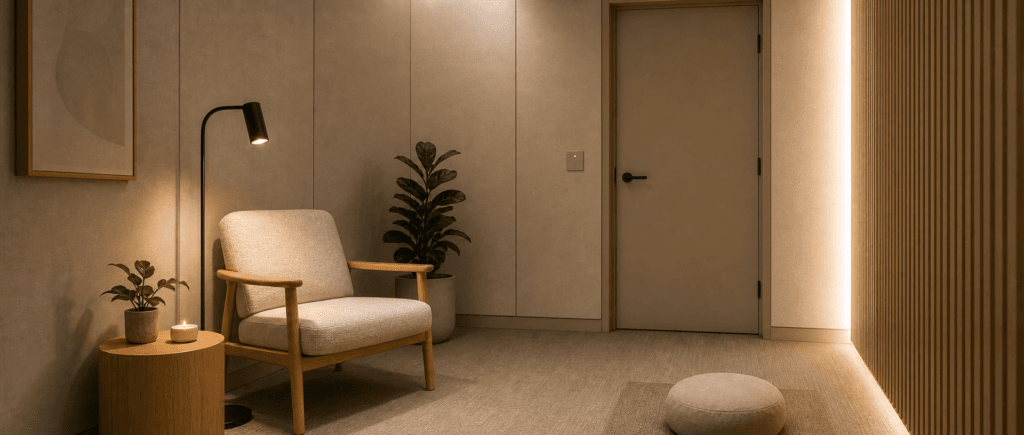
“Wellness” is a broad label. Give this space a specific purpose: a short pause from work, with no expectation to answer messages, talk to colleagues, or join an activity. Meditation is welcome, but employees should be equally free to sit and do nothing.
Keep lactation, medical care, and focused desk work under their own arrangements. A recovery break should not compete with those uses or become a quieter place to finish emails.
Before buying furniture, ask staff one practical question: what currently stops you from taking an undisturbed break? Someone who can hear sales calls through a closed door needs a different fix from someone whose quiet space is routinely booked for meetings.
Wellness Room Rules: Stop Calls, Meetings and Storage Taking Over
The first “quick call” is an operating decision. If it becomes acceptable, the next employee cannot tell whether quiet rest still takes priority. Put the boundary on the door, in booking instructions, and in the guidance managers give their teams.
Use this short rules card, adding a coordinator’s name and contact:
Quiet Breaks — Rest or Meditate
Leave calls, meetings, and work tasks outside. This space is not available for overflow work or storage.
Silence notifications. Keep personal audio in headphones at a level others cannot hear.
Check the reservation record before entering and respect the occupied sign.
Finish within your slot, take your belongings, and leave the seat and surfaces ready for the next person.
Contact the coordinator about interruptions, booking conflicts, spills, or faults.
Make a coordinator responsible for applying the rules, with a backup when they are absent. Employees should not have to negotiate with a manager holding an impromptu meeting to claim their reserved break.
Give the coordinator a response to misuse
For a call or meeting, ask the participants to move to the appropriate work area and remind them of the quiet-break purpose. For stored boxes or equipment, arrange removal with the person who left them and identify an actual storage location. Merely moving the items into a corner leaves the problem unresolved.
If the same misuse continues, record the activity and time, then raise it with the responsible manager. Review whether staff lack call space, whether instructions are unclear, or whether managers are treating the policy as optional. Correct that cause; do not solve a meeting-space shortage by routinely cancelling recovery breaks.
Managers should follow the same boundary. Avoid “unless an urgent meeting needs it” wording that makes every reservation uncertain.
Make the Space Feel Separate from Work
Listen for distractions before choosing finishes
Physical enclosure is only the starting point. Sit in the intended seat during a busy part of the day, with the door closed and ventilation operating normally. Spend the length of a proposed break there: a quick look inside can miss intermittent noise.
Ask whether you can follow nearby conversations, whether sudden sounds keep drawing your attention, and whether the fan becomes the dominant sound. Record what happened and when, then use that information to decide what to investigate.
| What interrupts the break? | What to check next |
|---|---|
| Clearly understandable calls or meetings | Ask facilities or the supplier to assess the location and sound transmission through the enclosure, including the door and other openings. |
| Repeated door slams or passing conversation | Check nearby circulation and door use; consider a quieter location before adding decorative finishes. |
| A persistent rattle or distracting fan | Arrange a maintenance check at the normal ventilation setting. Do not turn ventilation off to make the space sound quieter. |
| Notifications or audio from inside | Revisit device and headphone rules before changing the acoustic specification. |
Repeat the listening check after changes, at a comparable busy time. This checks suitability for a quiet break; it does not produce a certified acoustic rating. Bring specific observations to the person assessing the problem rather than requesting an undefined “soundproof” result.
Choose warm light that employees can adjust easily
Give the wellness space its own lighting choice instead of automatically extending the general office scheme. A warm-white default is a practical starting point. Where adjustable color temperature is available, let users choose a warmer or cooler appearance that feels comfortable.
Brightness and color temperature need separate attention. Dimming reduces light output; it does not necessarily change cool-white light into warm-white light. Confirm the fixture’s actual functions before ordering.
Try the controls while seated. Can someone find them without instructions, reduce glare, and return to a comfortable setting? Check whether an exposed lamp shines directly into their eyes when they lean back. Keep enough illumination to move safely, and label a simple default for the next user.
During a trial, ask people to choose their preferred setting. Use those responses to set the default, without presenting one shade of light as a guaranteed relaxation treatment.
Let the layout support a pause
Start with a supportive chair, a small surface for personal items, and a hook for a coat or bag. Provide a seated option even if meditation cushions are available. Leave clear movement space and make controls reachable for the employees who will use them.
Avoid a workstation, presentation screen, or spare supply shelving. Those fittings invite the activities the rules exclude. Check the view from nearby desks and the corridor: someone sitting quietly should not feel on display. Use appropriate screening and an obvious occupied indicator, with an access arrangement that supports easy exit and the site’s emergency procedures.
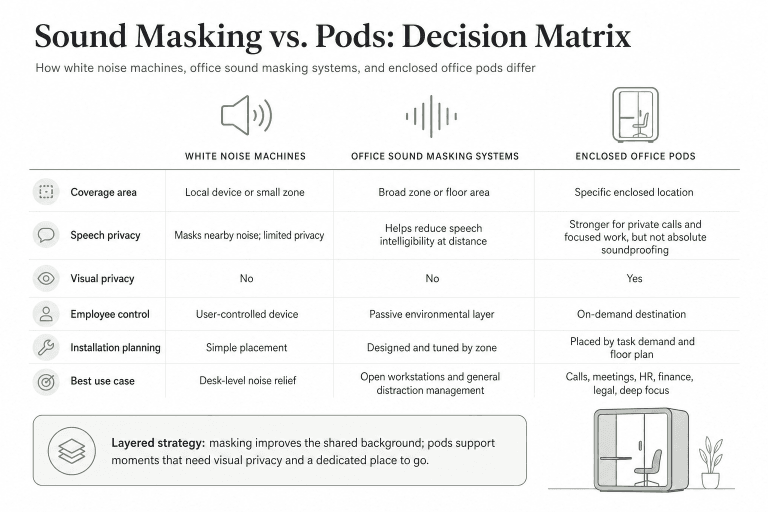
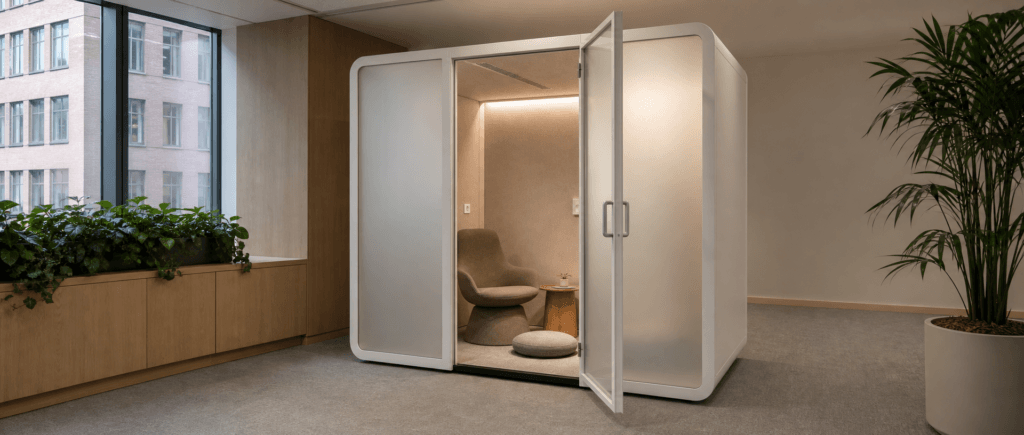
An existing enclosed space is a good candidate if it passes these checks and can stay dedicated to quiet breaks. If no suitable space is available, compare office pods against the same brief. Ask for the proposed seating layout, acoustic evidence, ventilation arrangement, visual screening, and actual lighting controls; check the installed result in its intended location. A booth configured for working calls needs its own suitability review before being used for rest.
Use One Simple Booking Method
Use a third-party option such as Google Calendar or a booking sheet hung by the entrance. Neither needs to be integrated with the pod.
Choose one reservation record. A paper schedule and an independently edited calendar create two versions of availability. An occupied sign can sit alongside either option, but it shows current use rather than future reservations.
Shared Google Calendar
A shared calendar suits teams who want to check availability from their desks. Name it “Wellness — Quiet Breaks” and decide whether employees make their own reservations or request them through the coordinator.
Google’s official calendar-sharing guidance distinguishes free/busy viewing from access to event details and editing; workplace administrators can restrict sharing. Have the administrator choose suitable permissions and check what an ordinary colleague can see.
Use neutral event titles such as “Reserved,” without health details or explanations for the break. For manual self-booking, tell users to check for overlapping events before adding a slot and cancel unused reservations promptly. Do not assume the calendar prevents conflicts or knows whether someone is inside.
Paper sheet or notebook by the entrance
For a nearby team using one location, paper can be sufficient. Show today’s date and start/end times, with only the identifier needed to resolve a booking dispute. Keep a pen beside it and give the coordinator responsibility for replacing the daily sheet or turning to a fresh page.
Do not ask people to record their reason for visiting. Keep previous pages out of public view and handle them under the workplace’s records policy. Provide the coordinator’s contact in case the schedule is missing or illegible.
Decide the exceptions before launch
Set an initial slot length around the team’s break arrangements and demand. For example, trial 20 minutes including a brief reset before leaving; adjust it after observing use. This is a policy example, not a wellness standard.
- Walk-in: check availability, record the visit, and finish before the next reservation.
- Cancellation: remove the reservation so someone else can use the time.
- No-show: set a grace period in advance; let the coordinator release the slot only after confirming it is unoccupied.
- Overrun: contact the coordinator rather than opening the door because a calendar entry has ended.
- Cleaning or repair: block the time in the same reservation record and post a temporary closure notice.
Avoid recurring holds unless there is a clear need: an unused repeating event can make an otherwise empty space look unavailable. Keep urgent welfare concerns on the workplace’s established response procedure.
Separate the User Reset from Routine Cleaning
Leaving the space tidy takes a user a moment; cleaning it properly needs an assigned service. Write both responsibilities into the operating brief.
| When | Who acts | What they do |
|---|---|---|
| Before leaving | User | Take belongings and rubbish, return the seat to its position, restore the default light setting, and report spills. |
| At scheduled cleaning times | Assigned cleaner | Clean shared surfaces using products and methods suitable for the finishes, following care instructions. Flag anything needing extra attention. |
| At the daily opening check | Coordinator or backup | Check the reservation record, occupied sign, seat, lighting controls, and any reported issue before making the space available. |
| After a fault or spill that prevents use | Coordinator and facilities team | Mark it unavailable, arrange the necessary work, and confirm readiness before removing the closure notice. |
Start without shared blankets if nobody is responsible for laundering them. If washable cushions or covers are offered, define where used items go and who supplies clean replacements. Choose a setup that can be kept ready throughout the day.
Schedule routine cleaning so it is visible to people making reservations. Name who reopens after an unscheduled closure; otherwise a fixed problem can leave the space unavailable for the rest of the day.
Trial the Whole Break, Then Fix What Interrupted It
Before wider use, ask several employees to try an ordinary break, including finding a slot, entering, sitting quietly, adjusting the light, and leaving it ready. Include people with different seating and access needs. Request feedback about the experience, without asking for personal health information.
Use one prompt: “What stopped this from feeling like a break from work?” Follow up on the specific obstacle:
- Could they hear enough conversation to keep following work outside?
- Did someone interrupt, attempt a call, or take the reserved time?
- Could they choose comfortable lighting without help?
- Was the seat clean and ready, with a clear place for belongings?
- Did the booking instructions match what happened at the entrance?
Log each problem with a responsible person and a next check date. Fix intrusive speech before buying more accessories; address repeated meeting takeovers with managers; simplify controls that users cannot understand.
After the first week of regular use, review those issues with the coordinator. Keep the rules card, reservation instructions, cleaning schedule, and contact details together so the next person managing the space can continue the same routine.