An office relocation checklist works when every task has an owner and a clear finish line. Start with the three dates that take longest to confirm: the notice period and hand-back terms in your current lease, building approval and fit-out at the new space, and installation of the new internet line. Turn each one into a deadline counted back from your move date; whichever deadline comes first is when planning has to start. Then run the move in six phases: decide and plan, prepare the new office, inventory and tell people, move week, hand back the old office, and the first week. If one team is moving within the same building, use the short checklist further down.
Last Updated: November 4, 2026 | Author: Richard | Estimated Reading Time: 13 minutes
Start with the three longest lead times
These three dates are set by other parties, so a bigger moving crew cannot shorten them. Get each one in writing before you choose a move date.
| Lead time | Who confirms it | What to ask for |
|---|---|---|
| Lease notice and hand-back | Landlord or managing agent, checked against your lease | The last date to serve notice, the lease end date, and the condition the space must be returned in: removal of fixtures, repairs, redecoration, cleaning |
| Approval and fit-out at the new space | Building management and your fit-out contractor | How long building approval takes, the works schedule, and the date the space is handed over ready for furniture and IT |
| New internet line | Your carrier or internet provider | The installation date, whether it is confirmed or estimated, and whether it depends on cabling or entry work inside the building |
Then turn each lead time into a deadline counted back from move day. An example with illustrative inputs, not typical values: you plan to move two weeks before the lease ends, and the lease requires six months’ notice, about 26 weeks, so notice is due about 24 weeks before move day. Building approval takes four weeks, the works take ten, and you want two weeks of testing before staff arrive, so the approval application has to go in 16 weeks before move day, with the new lease signed and the fit-out design ready by then. The carrier quotes ten weeks for a new line; with the same testing buffer, the order has to be placed 12 weeks before move day. The notice deadline comes first, so planning starts about 24 weeks before move day. By then you need the decision to move and, if you will not serve notice until the new lease is signed, the new lease as well.
If any of the three dates is only an estimate, that is the date to chase. A carrier date that depends on work inside the building also depends on building approval for that work.

Office relocation checklist by phase
Name one move lead before anything else: a person who can decide on budget, dates and trade-offs, and who owns this list. Each task below names the role that should own it. In a small company one person may hold several roles, but every task still needs a name next to it.
1. Decide and plan
| Task | Owner | Done when |
|---|---|---|
| Name the move lead and an owner for facilities, IT, people and finance | Leadership | Each workstream has one named person |
| Confirm the notice date, lease end date and hand-back obligations | Move lead with finance or legal | Dates and obligations are written into the move plan |
| Get the three long lead times in writing | Move lead | Landlord, building and carrier dates are on file |
| Set the budget, including the old office | Finance | Budget covers reinstatement, disposal, movers, new purchases and a contingency line |
| Choose the move date around business-critical dates | Move lead with department heads | Date agreed, with no month-end close, launch or audit in move week |
| Plan headcount and layout for the new space | Facilities | Every person and team has a place on the approved layout |
2. Prepare the new office
| Task | Owner | Done when |
|---|---|---|
| Submit building approvals and start fit-out | Facilities with contractor | Approval received and works schedule signed |
| Order the internet line, cabling and Wi-Fi | IT | Installation date confirmed in writing; every data outlet tested |
| Order furniture, pods and equipment with long delivery times | Facilities | Delivery date falls after fit-out completes and before move day |
| Check power and data at every desk, meeting room and booth location | Facilities with IT | Each location on the layout has been checked on site |
| Set up access control and keys | Facilities | Badges and keys tested for every user group |
| Agree the defect list with the contractor | Facilities | Each defect has a fix date before move day |
3. Inventory and tell people
| Task | Owner | Done when |
|---|---|---|
| Inventory every asset and tag it move, stay or dispose | Facilities with IT | Every item has a tag and a destination room |
| Tell employees the date, new address, commute options and packing duties | HR or people team | Message sent, with one person named to answer questions |
| Notify clients, suppliers, banks, insurers and registration bodies | Finance with office manager | Contact list completed and address change dates set |
| Schedule address changes on the website, business listings, invoices and email signatures | Marketing with office manager | Changes scheduled for move day |
| Book movers and walk both buildings with them | Move lead | Mover has seen the route, loading areas and elevators at both sites, and their insurance cover has been checked against the value of what they will carry |
| Book loading docks and service elevators at both buildings | Facilities | Written booking from both buildings, with any certificate of insurance they require accepted |
4. Move week and move day
| Task | Owner | Done when |
|---|---|---|
| Issue labels that match room numbers on the new layout | Office manager | Every box and item label matches a room on the plan |
| Back up data, shut down and label equipment | IT | Backup verified before shutdown; cables bagged and labeled |
| Set a packing deadline for desks and shared areas | Department heads | Desks and storage cleared by the deadline |
| Put one supervisor at each building on move day | Move lead | Two named people, each with the other’s and the mover’s phone numbers |
| Check items off the inventory as they arrive | Facilities | Every tag accounted for; damage photographed and logged |
| Run the day-one IT test before staff arrive | IT | Every item on the day-one list passes |
5. Hand back the old office
| Task | Owner | Done when |
|---|---|---|
| Remove disposed items and complete reinstatement | Facilities | Space matches the condition the lease requires |
| Wipe devices leaving the business | IT | Sanitization record kept for each device |
| Cancel or transfer utilities, internet and other services | Finance with IT | Each end date confirmed in writing |
| Walk through with the landlord and return keys | Move lead | Handover note signed or confirmed by email, with photos kept |
| Set up mail forwarding | Office manager | Forwarding active from move day |
6. First week in the new office
| Task | Owner | Done when |
|---|---|---|
| Brief everyone on fire exits, the assembly point and first-aid locations | Facilities | Briefing given on the first day; emergency contact list updated for the new address |
| Open a single issue list and review it daily | Facilities | Each issue has an owner and a fix date |
| Check every meeting room, booth and pod for power, ventilation, lighting and door operation | Facilities | Each space checked and logged |
| Confirm old-office services have stopped billing | Finance | No charges after the confirmed end dates |
| Update the floor plan and asset register | Facilities | Register shows each asset’s new location |
| Collect staff feedback at the end of the first week | HR or people team | Issues sorted into fix now and review later |
Some problems only show up with regular use, such as meeting rooms that are always booked or desk zones that are too noisy. Those need a few weeks of evidence, and a post-occupancy evaluation is the method for them once the first-week fixes are closed.
Short checklist for a small or same-building move
If one team is moving to another floor or a smaller suite in the same building, with no new internet line and no fit-out, this list covers most of the work:
- Confirm with building management that the new space is available on your date, and book the service elevator.
- Check the lease or license for both spaces: notice, hand-back condition and dates.
- Name one person in charge and one IT contact.
- Check power and network points at each new desk.
- Decide what moves, what stays and what is disposed of.
- Tell the team the date, new location and packing deadline.
- Label boxes and furniture with room numbers from the new floor plan.
- Back up data and label equipment before shutdown.
- Test connectivity, printers and meeting room equipment before people arrive.
- Check every item off the inventory as it arrives.
- Show the team the fire exits and assembly point for the new floor.
- Clean and photograph the old space before handing it back.
- Keep one issue list for the first week.
Decide what moves, what stays and what goes
Make this decision per asset type before you ask movers for quotes, because the answer changes the size of the move.
| Asset | Usual outcome | Check before deciding |
|---|---|---|
| Desks and chairs | Move if they fit the new layout | Dimensions against the new plan, condition, and the cost to move compared with replacing |
| Filing and storage | Reduce before moving | Record retention rules; what can be scanned or archived offsite |
| Computers, screens and phones | Move | Age and warranty; devices leaving the business need wiping |
| Servers and network equipment | Plan with IT, not with the movers alone | Downtime window; racks and power at the new site |
| Built-in partitions, glass rooms and kitchens | Stay or are removed under the lease | What the lease says about fixtures and reinstatement |
| Freestanding office pods and phone booths | Move | Route, flooring, glass handling and power at both sites |
| Kitchen appliances, plants and artwork | Move, donate or dispose | Who owns them and who removes them |
Where the right outcome is unclear, compare the cost of moving, repairing and replacing each item. Our guide to keeping, repairing, relocating or replacing office assets walks through that comparison.
Office pods and phone booths
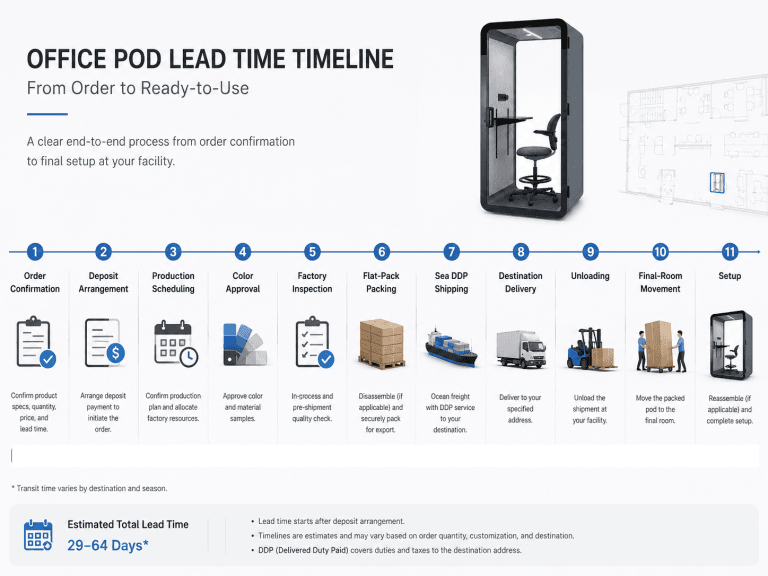
Office pods from B&H Ergonomics are freestanding and modular, with plug-in power and their own ventilation. They are not built into the space, so they can move with you. How they move depends on the route:
- Same floor, short distance, hard level floor: B&H Ergonomics single-person phone booths have heavy-duty casters and can be rolled a short distance on a hard, level surface. Do not roll a booth across long-fiber carpet.
- Another floor or another building: plan for disassembly and reassembly. Glass panels, door alignment, seals and power connections all have to go back together correctly.
B&H Ergonomics provides the installation manual and video guidance for its pods. Get both before the move and give them to the team that will take the pods apart and put them back together. The office phone booth relocation guide covers dismantling, packing and post-move checks step by step.
At the new office, confirm a power outlet, door swing clearance and free space around the ventilation openings at each pod location before move day. If you are buying new pods for the new space, schedule delivery after fit-out finishes and before staff arrive.
IT cutover: test before people arrive
Do not let the first employees to log in be the people who test the network. Write a day-one list and have IT run it between move day and the first working day in the new office:
- The internet line is live and delivering the services you ordered.
- Wi-Fi covers every desk area, meeting room and booth.
- Phones work, including the main number and call forwarding.
- Printers are connected and printing.
- Meeting room screens and video conferencing work.
- Badges and door access work for every user group.
- Alarm monitoring and security services have the new address.
Keep the old internet line running until the new one has passed a full working day. Canceling the old contract on move day leaves you with no fallback if the new line is late.
Decide the fallback before move day, too. If the new line is not live, staff can stay at the old office, work remotely for the day, or use mobile hotspots for essential work. The move lead makes that call, so agree in advance which option applies.
Computers, phones, printers and copiers that store data, and storage drives that are leaving the business, need wiping before they are sold, recycled or returned at lease end. NIST’s media sanitization guideline, SP 800-88 Rev. 2, published in September 2025, explains how to set up a sanitization program and choose a method based on the sensitivity of the data. If a disposal vendor does the work, ask for a record for each device that includes its serial number.
Decommission and hand back the old office
Office decommissioning means returning the old space in the condition the lease requires and closing everything tied to that address. The order matters, because each step leaves the space ready for the next:
- Agree the reinstatement scope with the landlord in writing: which fixtures, partitions and cabling must be removed, and what condition the space must be returned in.
- Clear everything tagged dispose, and keep receipts for items sold, donated or recycled.
- Complete the reinstatement works and repairs.
- Book the final clean for after the last contractor leaves.
- Walk through with the landlord or agent, photograph every room and keep the photos with the handover note. They are your record if the security deposit or restoration charges are disputed.
- Return all keys and badges, and ask building management to deactivate the badges.
Set the end dates for utilities, cleaning, security monitoring and waste collection after the walkthrough, not on move day, because contractors and cleaners still need power, water and access. Return leased equipment such as copiers once their storage has been wiped. Destroy paper records you no longer need to keep, and keep mail forwarding running until clients and suppliers have the new address.
FAQ
How far in advance should you plan an office relocation?
Work out three deadlines counted back from your move date: the last day to serve notice under your current lease, the day building approval for the new space must be applied for, and the day the new internet line must be ordered, each allowing time to test IT before people arrive. Planning starts at whichever deadline comes first. A move within the same building that needs no new line and no fit-out can usually be planned in weeks rather than months.
Who should manage an office move?
One move lead who can decide on budget, dates and trade-offs, supported by named owners for facilities, IT, people and finance. Decisions on move day, such as whether staff open the new office when the internet line is late, need one person with the authority to make them.
Can office pods be moved to a new office?
Yes, if they are freestanding modular pods. A B&H Ergonomics single-person phone booth can be rolled on its casters for a short move across a hard, level floor; a move to another floor or building needs disassembly and reassembly using the B&H installation manual and video guidance.