Kurzantwort
Anwesenheitssensoren für Büros können zwei verschiedene Dinge bedeuten. In einem Büro-Pod von B&H Ergonomics ist der Personensensor Sensor ein lokaler Anwesenheitsauslöser: Er erkennt, wenn sich jemand dem Pod nähert oder ihn betritt, und schaltet Beleuchtung und Belüftung des Pods ein. Das System schaltet diese Funktionen je nach Konfiguration nach einer kurzen Verzögerung von typischerweise einigen zehn Sekunden bis etwa einer Minute wieder aus. Es erfasst keine Belegungsdaten, verwendet keine Kamera und verbindet sich nicht mit einer Plattform für Arbeitsplatzanalysen.
Bei B&H-Konfigurationen ab Juni 2026 gehören Personensensoren bei Pods der Elite Series, Flex Series und Oasis Series zur Standardausstattung. Eine Occupancy Light ist eine separate Option für Elite und Flex. Sie ist eine sichtbare Anzeige, die auf beiden Seiten der Haupttür nahe deren Oberkante angebracht wird, damit Personen außerhalb sehen können, dass der Pod genutzt wird.
Zuletzt aktualisiert: 24. Juli 2026 | Autor: Richard | Geschätzte Lesezeit: 7 Minuten
Was ist ein Anwesenheitssensor in einem Büro-Pod?
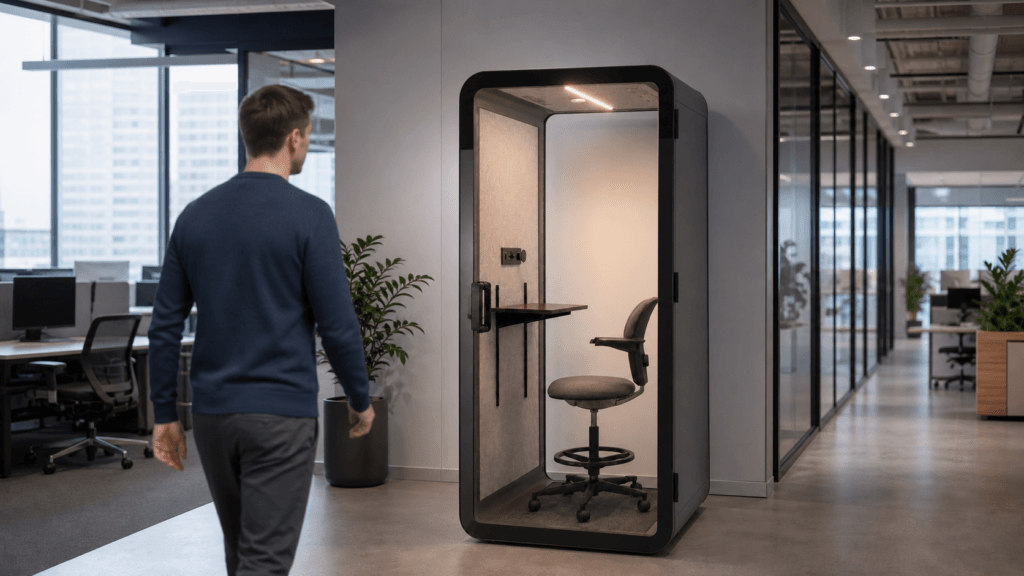
In diesem Artikel bezeichnet ein Anwesenheitssensor für Büros den eingebauten Personensensor des Pods und dessen lokale Steuerung. Der Sensor erkennt die Anwesenheit von Personen um den Pod herum und aktiviert die Pod-Umgebung. Er ist kein büroweites System zum Zählen von Personen, Messen der Auslastung, Verwalten von Reservierungen oder Speichern von Arbeitsplatzanalysen.
Diese Unterscheidung ist wichtig, wenn Facility-Teams Produktbeschreibungen vergleichen. Ein Sensor kann bewirken, dass ein Pod automatisch reagiert, ohne aufzuzeichnen, wer ihn genutzt hat, wie lange die Person darin war oder wie oft der Raum reserviert wurde.
Wie aktiviert der Personensensor Beleuchtung und Belüftung?
Der Personensensor folgt einer einfachen lokalen Abfolge:
- Eine Person nähert sich dem Pod oder betritt ihn.
- Der Personensensor erkennt die Anwesenheit der Person. Die Erkennung kann erfolgen, bevor sich die Tür öffnet.
- Der Pod aktiviert seine Beleuchtung und Belüftung.
- Der Nutzer kann Helligkeit, Farbtemperatur und Lüfterbetrieb manuell einstellen.
- Wenn der Pod nicht mehr belegt ist, schalten sich Beleuchtung und Belüftung nach einer kurzen Verzögerung aus.
Die genaue Abschalteinstellung hängt von der Konfiguration ab. Für die Planung beschreibt B&H die Verzögerung mit ungefähr einigen zehn Sekunden bis etwa einer Minute. Diese Verzögerung ermöglicht eine kurze Unterbrechung oder Türbewegung, ohne dass der Pod sofort dunkel wird oder der Luftstrom unmittelbar stoppt.
Der Sensor dient dazu, die Pod-Umgebung am Nutzungsort zu steuern. Er sollte nicht als Gebäudeleitsystem oder System zur Belegungsberichterstattung beschrieben werden.
Personensensor oder Occupancy Light: Worin liegt der Unterschied?
Die Begriffe hängen zusammen, beschreiben aber unterschiedliche Teile der Pod-Nutzung.
| Merkmal | Personensensor | Occupancy Light |
|---|---|---|
| Hauptaufgabe | Erkennt die Anwesenheit von Personen und aktiviert Beleuchtung und Belüftung des Pods | Zeigt Personen außerhalb, dass der Pod genutzt wird |
| Ergebnis für Nutzer | Die Pod-Umgebung startet automatisch | An der Außenseite des Pods erscheint eine sichtbare Anzeige |
| Standort | In das Erfassungs- und Steuerungssystem des Pods integriert | Nahe der Oberkante auf beiden Seiten der Haupttür |
| Konfiguration | Standard bei Elite, Flex und Oasis für B&H-Konfigurationen ab Juni 2026 | Separate Option für Elite und Flex verfügbar |
| Datenverhalten | Lokale Steuerung; es wird kein Belegungsdatensatz erstellt | Sichtbare Statusanzeige; keine Analyseanzeige |
Eine Occupancy Light ist daher nicht dieselbe Option wie der Personensensor. Der Personensensor lässt den Pod reagieren. Die optionale Leuchte hilft Kollegen in der Nähe zu erkennen, dass jemand den Pod nutzt, insbesondere wenn Tür oder Wandaufteilung die direkte Sicht einschränken.
Sensor- und Steuerungsoptionen bei Elite, Flex und Oasis
Die folgende Matrix fasst die Konfigurationsinformationen zusammen, die Facility-Teams beim Vergleich der B&H-Pod-Familien verwenden sollten.
| Pod-Familie | Personensensor | Occupancy Light | Manuelle Nutzersteuerungen |
|---|---|---|---|
| Elite-Serie | Standard für Konfigurationen ab Juni 2026 | Optional | Helligkeit, Farbtemperatur und Lüfterbetrieb |
| Flex-Serie | Standard für Konfigurationen ab Juni 2026 | Optional | Helligkeit, Farbtemperatur und Lüfterbetrieb |
| Oasis-Serie | Standard für Konfigurationen ab Juni 2026 | Bestätigen Sie die aktuelle Konfiguration, wenn eine Außenanzeige erforderlich ist | Helligkeit, Farbtemperatur und Lüfterbetrieb |
Alle drei Familien verwenden den Personensensor für den automatischen lokalen Betrieb. Der praktische Unterschied besteht darin, ob der Käufer zusätzlich die separate außen angebrachte Occupancy Light wünscht. Bei der aktuellen Auswahl an Büro-Pods von B&H Ergonomics, fragen Sie nach der genauen Konfiguration, wenn die Anzeigeleuchte Teil des Orientierungskonzepts am Arbeitsplatz ist.
Was sollten Facility Manager vor der Bestellung bestätigen?
Eine kurze Prüfung der Spezifikation kann Verwechslungen zwischen automatischer Steuerung und sichtbarer Statusanzeige verhindern.
- Pod-Familie und Produktionszeitpunkt: Bestätigen Sie, ob die Bestellung eine Konfiguration der Elite Series, Flex Series oder Oasis Series betrifft, die vom Update zum Standardsensor im Juni 2026 erfasst ist.
- Umfang des Personensensors: Bestätigen Sie, dass der Sensor sowohl Beleuchtung als auch Belüftung startet und eine Annäherung vor dem Öffnen der Tür erkennen kann.
- Anforderung an die Occupancy Light: Entscheiden Sie, ob Personen außerhalb eine sichtbare Nutzungsanzeige benötigen. Fordern Sie bei Elite und Flex die separate Option Occupancy Light an, statt sie als Teil des Personensensors zu behandeln.
- Position der Anzeige: Bestätigen Sie, dass die Anzeige nahe der Oberkante auf beiden Seiten der Haupttür angebracht ist und vom für Ihr Büro wichtigen Verkehrsweg aus sichtbar ist.
- Manuelle Steuerungen: Bestätigen Sie, dass Nutzer Helligkeit, Farbtemperatur und Lüfterbetrieb für das ausgewählte Modell einstellen können.
- Abschaltverhalten: Bitten Sie den Anbieter, die konfigurierte Verzögerung für Beleuchtung und Belüftung zu dokumentieren. Planen Sie mit einer kurzen Verzögerung von einigen zehn Sekunden bis etwa einer Minute, nicht mit einer sofortigen Abschaltung.
- Daten- und Datenschutzgrenze: Bestätigen Sie, dass der ausgewählte Pod ausschließlich lokale Erfassung verwendet und für diese Funktion weder Kamera noch Belegungshistorie oder Netzwerkverbindung benötigt.
- Übergabe bei der Inbetriebnahme: Nehmen Sie Auslösung und Verzögerungsverhalten des Sensors in die Übergabe bei der Installation auf, damit die Mitarbeiter des Facility Managements wissen, was Nutzer am ersten Tag erwarten können.
Erfasst oder überträgt der Sensor Nutzerdaten?
Nein. Der hier beschriebene B&H-Personensensor bietet lokale Steuerung für Beleuchtung und Belüftung des Pods. Die Konfiguration verwendet keine Kamera, erstellt kein Belegungsprotokoll und überträgt keine Nutzungsinformationen über ein Netzwerk. Die optionale Occupancy Light ist ein sichtbares Statussignal für Personen in der Nähe; sie ist weder Dashboard noch Datenanzeige.
Dadurch lässt sich die Funktion Mitarbeitern leichter erklären: Der Pod reagiert, wenn jemand anwesend ist, während die Steuerungsfunktion lokal im Pod bleibt.
Wann ist sensorbasierter Pod-Betrieb besonders nützlich?
Die automatische Erfassung ist nützlich, wenn ein Pod einsatzbereit sein muss, ohne dass jeder Nutzer erst einen Schalter finden muss. Häufige Situationen sind:
- Großraumbüros, in denen sich Personen schnell zwischen gemeinsam genutzten Arbeitsbereichen bewegen;
- Telefon- und Videoanrufe, bei denen der Nutzer sofort Licht und Luftstrom benötigt;
- flexible Sitzbereiche, in denen derselbe Pod den ganzen Tag unterschiedlichen Personen dient;
- Büros, in denen ein externes Statussignal Unterbrechungen und unnötige Türkontrollen reduzieren kann.
Bei dieser Funktion geht es weniger darum, das Büro zu messen, als darum, jeden Pod in dem Moment vorhersehbar zu machen, in dem ihn jemand nutzt. Falls ein Projekt Auslastungsberichte, Reservierungen oder gebäudeweite Belegungs-Dashboards erfordert, sind das separate Anforderungen, die unabhängig vom lokalen Personensensor des Pods bewertet werden sollten.
FAQ
Haben alle B&H-Büro-Pods einen Personensensor?
Bei B&H-Konfigurationen ab Juni 2026 gehören Personensensoren bei der Elite Series, Flex Series und Oasis Series zur Standardausstattung.
Kann der Sensor aktiviert werden, bevor sich die Pod-Tür öffnet?
Ja. Der Personensensor kann eine Person erkennen, die sich dem Pod nähert, sodass Beleuchtung und Belüftung schon vor dem Öffnen der Tür starten können.
Was steuert der Sensor im Pod?
Er aktiviert Beleuchtung und Belüftung des Pods. Nutzer können anschließend Helligkeit, Farbtemperatur und Lüfterbetrieb manuell einstellen.
Ist eine Occupancy Light dasselbe wie ein Personensensor?
Nein. Der Personensensor erkennt Anwesenheit und aktiviert die Pod-Umgebung. Die Occupancy Light ist eine separate Option für Elite und Flex, die Personen außerhalb zeigt, dass der Pod genutzt wird. Sie wird auf beiden Seiten der Haupttür nahe deren Oberkante angebracht.
Erfasst oder überträgt der Sensor Belegungsdaten?
Nein. Die beschriebene B&H-Konfiguration verwendet ausschließlich lokale Erfassung. Sie hat für diese Funktion weder Kamera noch Belegungshistorie oder Netzwerkverbindung.