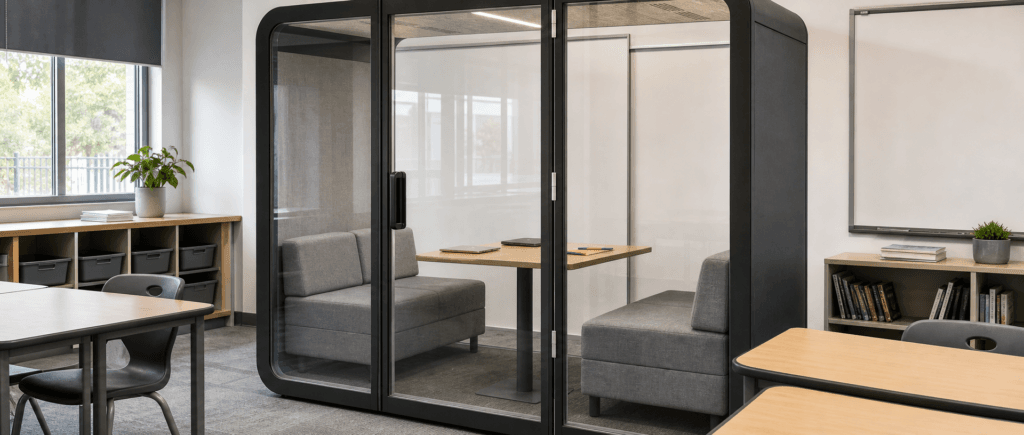
Small-group discussion needs a place in a lesson where other students are working on different tasks. Classroom pods provide an enclosed space within an existing classroom for that spoken activity. In middle and high schools, they can serve group discussion, peer tutoring, and remote lessons while the teacher oversees the wider class.
For lessons built around four students, start with a four-person layout: two facing double sofas and a table between them. The teacher usually stays outside, observing and checking in as students work. Plan how the group will ask for help and bring its work back into the main lesson.
Last Updated: September 17, 2026 |Author: Richard
What Are Classroom Pods Used for in Middle and High Schools?
A classroom pod gives a small group a defined place to compare solutions, rehearse a presentation, discuss a text, or work through questions with a remote tutor. Give each session a specific output, such as a shared explanation, an annotated passage, or a list of questions for the teacher.
For tutoring, plan around either peer support between students or an online session led by a remote tutor. The classroom teacher can brief the students, review their work, and respond to questions from outside. A lesson that needs an adult continuously beside the students requires a different seating and staffing arrangement.
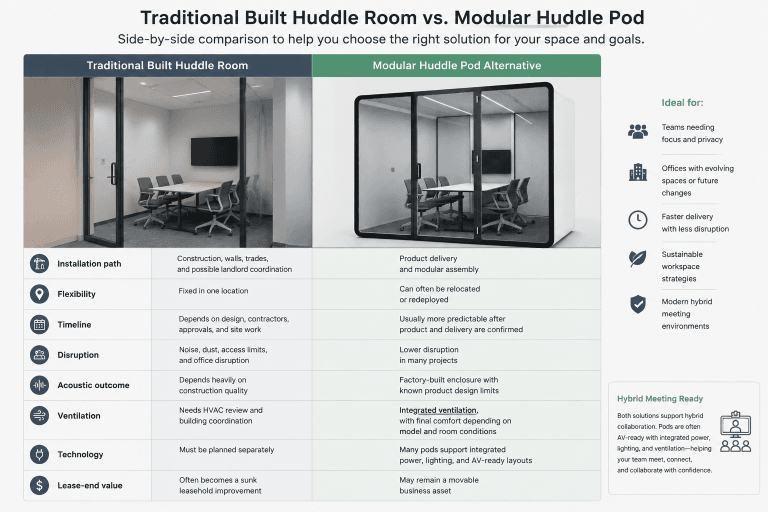
These indoor spaces fit into an existing classroom and lesson schedule. Outdoor modular classrooms involve a different building and space-planning decision.
Choose an activity that students can begin with the teacher’s instructions and continue between check-ins.
Plan Around Four-Person Groups, with Flexibility for Pairs
When four students are the regular working group, use that group size as the procurement baseline. Schedule the space for pairs as well when the lesson calls for two students to work together.
In the facing-sofa arrangement, two students sit on each sofa, with the central table holding their shared materials.
For paired discussion, seat one student on each sofa. When two students need to read the same document or use one laptop, they can sit together on one sofa. The furniture stays in place as the activity changes.
Count everyone who will be inside. Four students use all four places in a four-person configuration. If an adult needs to join them, arrange a smaller student group or evaluate a configuration specified for the larger total.
Match Each Pod Session to a Clear Teaching Task
Use the following planning examples to connect group size with a lesson output and a teacher check-in.
| Activity | Students inside | Task to set before entry | Teacher’s role outside |
|---|---|---|---|
| Small-group discussion | Four | Agree on an answer and record the reasoning | Review progress at an agreed checkpoint and ask the group to explain its decision |
| Presentation preparation | Four | Divide speaking roles and rehearse a short section | Check participation and review the rehearsal at the handoff |
| Paired learning | Two | Compare approaches to a question and identify differences | Give feedback on the reasoning and resolve questions |
| Peer tutoring | Two | Work through a defined set of questions and flag unresolved steps | Check explanations and understanding before the pair moves on |
| Remote tutoring | Two or four, within the selected configuration | Open the shared material and prepare questions for the tutor | Manage the classroom, remain available locally, and coordinate with the remote tutor |
A shared answer or set of notes gives the teacher something concrete to review when the group returns to the main lesson.
Example: a four-student text discussion
After introducing a passage to the class, ask a group of four to discuss one question in the pod. Each student selects a piece of evidence from the text and explains how it supports their answer. The group then agrees on a response and records any point they could not resolve.
Meanwhile, the remaining students complete a related task in the main classroom, with the teacher supervising both areas. At the agreed handoff, the group brings its answer back for feedback. This gives the pod session a clear beginning, a reason for students to talk, and an outcome the teacher can use.
Keep Teacher Supervision Central to the Layout
Check views from the places the teacher actually works
Mark the teaching position, main circulation route, pod entrance, and student seats on the classroom plan. Check the view into the pod from those positions. Screens, furniture, opaque panels, reflections, and students facing away can change what the teacher can observe.
Use the school’s supervision and safeguarding procedures to decide whether the arrangement is acceptable. A glazed wall provides a view; the operating plan still needs to identify who is responsible for the students and when the teacher checks in.
Make requests for help easy to notice
Agree on a clear help signal and test it from the teacher’s normal working positions. Students also need to know what to do if the teacher does not notice it. Do not make the plan depend on speech being intelligible through a closed enclosure.
Set out how the teacher will interrupt the activity, bring students back to the main lesson, and communicate urgent instructions. Check those arrangements with the school’s site team alongside the proposed pod location.
Keep the rest of the class in the plan
Assign the other students a task with clear instructions while the pod group works. Place teacher check-ins at points that fit both activities. If the pod session requires sustained adult attention, revise the staffing or activity plan so the rest of the class remains supervised.
Build Small-Group Sessions into the Lesson Rotation
Plan the handoff as carefully as the activity itself:
- Brief the group. Explain the task, expected output, available materials, and how to request help before students enter.
- Start the session. Have students open the relevant documents and confirm that any required equipment works.
- Check progress. Review an intermediate answer or question while continuing to supervise the classroom.
- Close the task. Give a clear finish signal and ask students to save or collect their work.
- Reset and reconnect. Clear materials for the next group, then bring the students’ result into classroom feedback.
Include entry, equipment setup, and changeover in the planned slot. A short task that needs lengthy setup may work better at an open table. Keep commonly used materials ready so the next pair or group can start without searching for cables or worksheets.
Prepare the Pod for Hybrid Lessons and Remote Tutoring
For remote tutoring, have students open the shared lesson materials before the session begins. Confirm that they can hear the tutor, take turns speaking, and share their work during the discussion.
For a remote student joining an in-person group, check how that student will see shared notes and enter the discussion. Position the display so the local students can address the remote participant without repeatedly turning away from the group.
Use a coordinated audio setup. Multiple nearby devices connected with active microphones and speakers can create feedback or echo; test the intended arrangement before the lesson. Confirm power, network access, school-approved software, and where equipment will be stored between sessions.
The remote tutor leads the agreed teaching activity. Assign on-site responsibility separately so students know which adult handles local assistance and classroom supervision.
Turn the Teaching Plan into a Four-Person Pod Brief
Bring three things to the product discussion:
- The group and layout: four student places on two facing double sofas, with a central table and flexibility for paired work.
- The teaching use: the activities, session length, shared materials, and any remote-tutoring equipment, with the teacher usually outside.
- The classroom location: the proposed position and access route, for the school’s facilities team to review alongside circulation, accessibility, fire safety, and the model’s ventilation and acoustic information.
Use that brief to compare meeting pod configurations from B&H Ergonomics. Ask for the actual layout and specifications of the candidate model so the discussion addresses your students, equipment, and classroom rather than seat count alone.
When an Open Group Table Works Better
An open table is a useful choice when students need frequent whole-class instructions, repeated teacher intervention, or quick movement between activities. Compare the benefit of a separate discussion space with the communication and transition demands of the lesson.