Szybka odpowiedź
Przydatny przewodnik po oświetleniu kabiny spotkań powinien pomóc zweryfikować więcej niż tylko to, czy kabina ma sufitową lampę LED. Porównaj, w jaki sposób światło dociera do twarzy i powierzchni roboczych, czy powoduje olśnienie lub pasmowanie obrazu z kamery, jak użytkownicy regulują jasność i temperaturę barwową oraz jak wymienia się uszkodzony komponent. Przed rozpoczęciem właściwego spotkania sprawdź podgląd obrazu z kamery i dostosuj oświetlenie, jeśli twarz wygląda na ciemną, na ekranie pojawiają się odbicia lub jasne tło wpływa na ekspozycję.
Ostatnia aktualizacja: 27 lipca 2026 | Autor: Richard | Szacowany czas czytania: 10 minut
Zacznij od sposobu użytkowania kabiny spotkań
Wymagania dotyczące oświetlenia zmieniają się w zależności od zadania. Kabina używana głównie do rozmów wideo wymaga wyraźnego oświetlenia twarzy i kontrolowanych odbić. Kabina wykorzystywana do przeglądania dokumentów potrzebuje komfortowego światła na powierzchni roboczej. Wspólna kabina spotkań powinna zapewniać użyteczne oświetlenie dla więcej niż jednego miejsca siedzącego, a nie tylko na środku stołu.
Rozpocznij rozmowę zakupową od trzech pytań:
- Gdzie będzie siedzieć każda osoba oraz gdzie zostaną umieszczone kamera i ekran?
- Czy kabina będzie używana do rozmów wideo, spotkań osobistych, pracy wymagającej koncentracji czy do połączenia tych zastosowań?
- Jakie światło dzienne, oświetlenie biurowe lub jasne tła będą widoczne przez szkło?
Odpowiedzi określają, co należy sprawdzić. Jasna oprawa sufitowa może oświetlać stół, pozostawiając oczy użytkownika w cieniu. Z kolei dodanie większej ilości światła bez kontroli jego kąta może powodować olśnienie na laptopie, ekranie, panelu szklanym lub błyszczącym blacie.
Gdy rozmowy wideo są głównym zastosowaniem, porównaj oświetlenie wraz z wentylacją, akustyką, dostępem do zasilania, wyposażeniem i położeniem kamery podczas przeglądania kapsuła do wideokonferencji. Oświetlenie może poprawić obraz, ale nie zrekompensuje niewłaściwego położenia kamery ani niekontrolowanego okna znajdującego się bezpośrednio za użytkownikiem.
Które specyfikacje oświetlenia kabiny spotkań są istotne?
Traktuj poniższe elementy jako listę do weryfikacji, a nie uniwersalny standard zaliczenia lub odrzucenia. Właściwa wartość lub konfiguracja zależy od układu kabiny, oświetlenia w miejscu pracy, kamery, ekranu i planowanego zastosowania.
Położenie i rozproszenie światła
Zapytaj, gdzie znajduje się źródło światła względem twarzy użytkownika, stołu, kamery i ekranu. Dyfuzor lub układ oświetlenia pośredniego może ograniczyć cienie o wyraźnych krawędziach i widoczne punkty LED, ale końcowy efekt nadal należy ocenić z rzeczywistych pozycji siedzących.
W przypadku kabin dla wielu osób sprawdź każde miejsce siedzące. Układ, który wygląda na zrównoważony dla osoby siedzącej twarzą do drzwi, może powodować olśnienie lub cienie u osoby siedzącej pod oprawą albo obok niej.
Oświetlenie twarzy
Natężenie światła poziomego na blacie i światło docierające do twarzy nie są tym samym pomiarem. Jeśli kabina będzie wykorzystywana do rozmów wideo, zapytaj dostawcę, jak oświetlana jest twarz na przewidzianym miejscu siedzącym i przy planowanym położeniu kamery. Jeśli zmierzone natężenie oświetlenia jest częścią wymagań projektu, zapisz płaszczyznę pomiaru, lokalizację, przyrząd, tryb oświetlenia i warunki otoczenia, aby dane dostawców można było porównać na tej samej podstawie.
Regulacja jasności
Regulacja jasności daje użytkownikom praktyczną możliwość dostosowania oświetlenia do różnych zadań, jasności ekranu, światła dziennego i osobistego komfortu. B&H Ergonomics może zapewniać regulowaną jasność oświetlenia kabiny spotkań. Wycena powinna jednak określać metodę sterowania i potwierdzać, czy regulacja jest płynna, czy wykorzystuje zaprogramowane poziomy dla wybranego modelu.
Regulowana temperatura barwowa
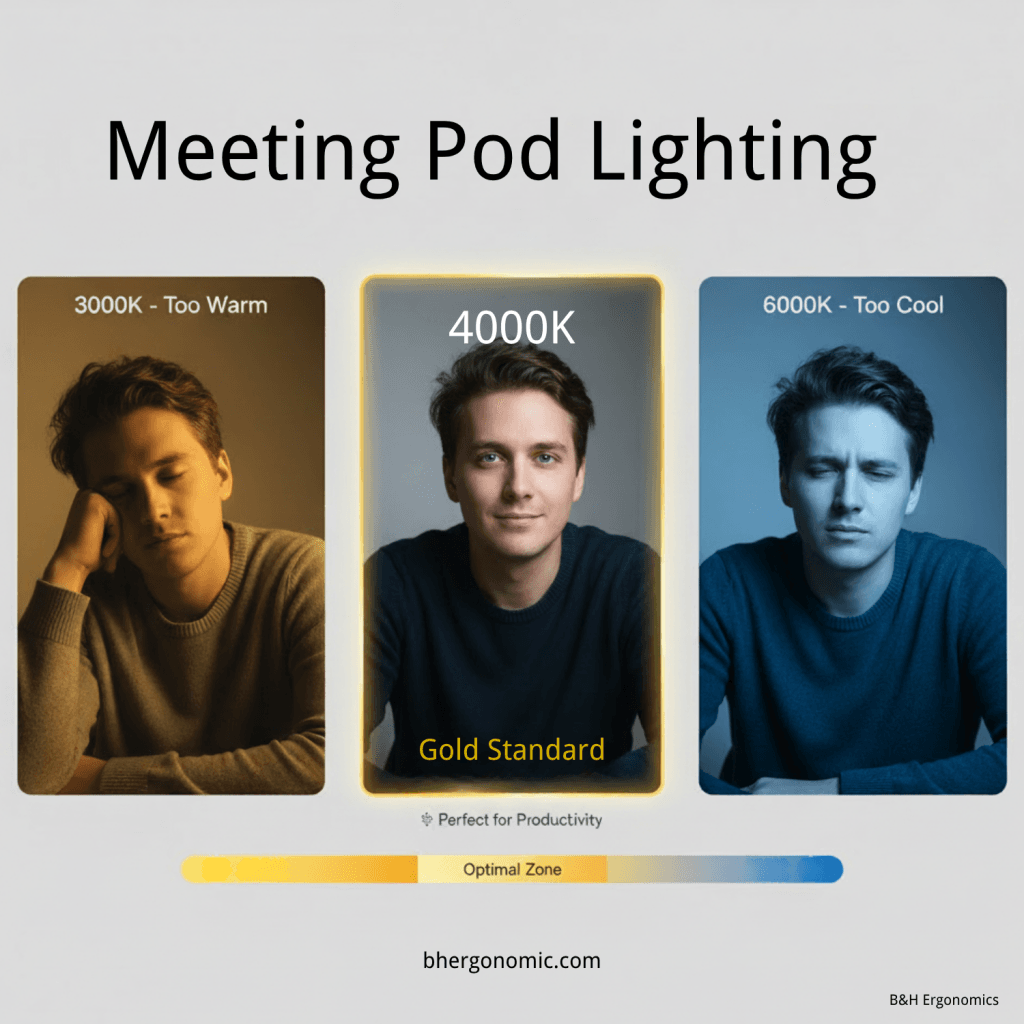
Temperatura barwowa zmienia wizualny wygląd białego światła — od cieplejszego do chłodniejszego. Nie ma jednego ustawienia, które automatycznie będzie najlepsze dla każdej kamery, pomieszczenia, karnacji i pory dnia. B&H Ergonomics może zapewniać regulację temperatury barwowej, dzięki czemu użytkownik może porównywać ustawienia w docelowym środowisku zamiast korzystać wyłącznie z jednej wartości. Poproś, aby oferta zawierała dostępny zakres lub ustawienia wstępne dla dokładnej konfiguracji.
Jakość światła
Wskaźnik oddawania barw, czyli CRI, to konwencjonalny sposób opisywania tego, jak źródło światła odwzorowuje określony zestaw kolorów w porównaniu ze źródłem referencyjnym. Dane dotyczące CRI mogą być przydatnymi informacjami od dostawcy, ale sama wartość CRI nie gwarantuje naturalnego wyglądu twarzy na konkretnej kamerze internetowej. Jeśli ma to znaczenie dla projektu, poproś o deklarowane dane dotyczące jakości barw, a następnie potwierdź efekt z użyciem kamery, wyświetlacza i wykończeń, które będą faktycznie stosowane.
Olśnienie i odbicia
Sprawdź, czy oprawa powoduje bezpośrednie olśnienie oraz olśnienie odbite od ekranów, szkła i powierzchni stołu. Test przeprowadź z normalnej wysokości oczu osoby siedzącej, a nie stojąc przy wejściu do kabiny. To koncepcja Light standardu WELL v2 jest użytecznym punktem odniesienia w projektowaniu komfortu widzenia, ograniczaniu olśnienia, jakości oświetlenia elektrycznego i kontroli użytkownika, ale kabiny nie należy opisywać jako posiadającej certyfikat WELL, jeśli odpowiedni certyfikat nie został faktycznie przyznany.
Migotanie i pasy na obrazie z kamery
Sterowniki LED mogą modulować strumień świetlny w sposób niewidoczny dla oka, ale widoczny na kamerze jako pasy lub zmiany ekspozycji. IEEE 1789-2015 zawiera zalecane praktyki dotyczące modulacji prądu w wysokiej jasności diod LED. Należy traktować ten dokument jako punkt odniesienia do dyskusji technicznej, a nie jako deklarację certyfikacji produktu.
Test z użyciem aparatu w telefonie może ujawnić oczywisty problem przy niektórych ustawieniach, ale nie jest formalnym testem migotania. Czas otwarcia migawki kamery, liczba klatek na sekundę, ekspozycja, częstotliwość sieci elektrycznej w danym regionie oraz konstrukcja sterownika mogą zmieniać obraz widoczny na ekranie. Jeśli parametry dotyczące migotania są wymaganiem projektowym, poproś o informacje o sterowniku lub dowody z testów wskazujące dokładny dostarczony komponent.
Sterowanie i serwisowanie
Potwierdź, czy sterowanie oświetleniem jest niezależne od wentylacji i innych funkcji kabiny, jak zmienia się ustawienia oraz czy ostatnie ustawienie zostaje zachowane po wyłączeniu zasilania. Zapytaj również, do których elementów można uzyskać dostęp i które można wymienić w przypadku awarii oświetlenia lub sterownika.
Oświetlenie kabiny spotkań B&H Ergonomics zaprojektowano tak, aby uszkodzony komponent oświetleniowy można było wymienić oddzielnie, bez konieczności wymiany całej kabiny. Ponieważ sposób dostępu do części i procedury ich wymiany mogą różnić się w zależności od modelu, w ofercie należy potwierdzić, jaka część podlega wymianie, jaki jest sposób dostępu, jaki jest numer referencyjny części zamiennej, zakres gwarancji oraz przewidywany kanał dostaw.
Dlaczego rozmowy wideo wymagają czegoś więcej niż oświetlenia sufitowego
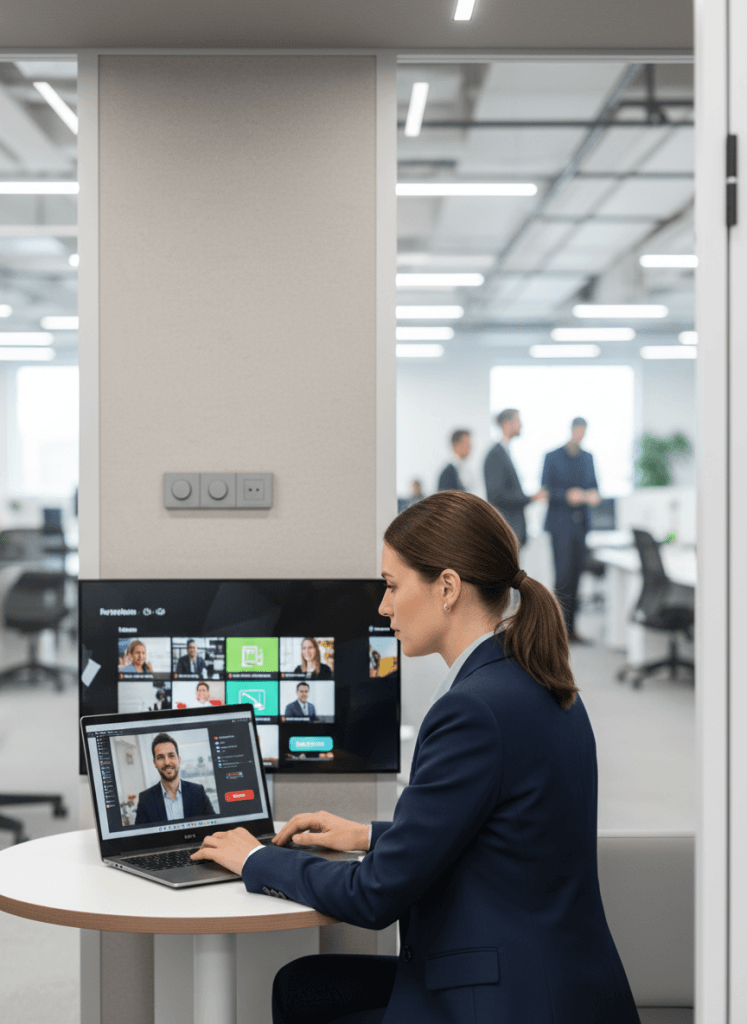
Rozmowa wideo łączy kilka problemów związanych z ekspozycją w niewielkiej przestrzeni. Kamera może jednocześnie rejestrować jasną szklaną ścianę, świecący ekran, zacienioną twarz i oprawę sufitową. Automatyczna ekspozycja może reagować na najjaśniejszy obszar kadru, pozostawiając twarz rozmówcy niedoświetloną.
Najczęstsze problemy z oświetleniem mają praktyczny charakter:
- Światło padające bezpośrednio z góry tworzy cienie wokół oczu i pod brodą.
- Jasne okno lub otwarta przestrzeń biurowa znajdująca się za użytkownikiem sprawia, że jego twarz wydaje się ciemniejsza.
- Widoczne źródło światła odbija się w szkle, okularach, ekranach lub polerowanych powierzchniach.
- Mieszane źródła światła o ciepłej i chłodnej barwie powodują niespójny balans bieli kamery.
- Zwiększenie jasności eliminuje jeden cień, ale tworzy odblaski w innym miejscu.
Rozwiązaniem nie zawsze jest dodatkowa oprawa oświetleniowa. Przed rozpoczęciem spotkania dostosuj ustawienie siedzeń i kąt kamery, kontroluj tło oraz sprawdź dostępne ustawienia jasności i temperatury barwowej. Jeśli twarz nadal nie jest równomiernie oświetlona, zapytaj, czy wyceniona kabina może pomieścić odpowiednie oświetlenie przednie lub boczne bez zasłaniania ekranu, wentylacji lub ograniczania przestrzeni użytkownika.
Sprawdź oświetlenie przed rozpoczęciem spotkania
Poświęć chwilę na sprawdzenie obrazu z kamery, zanim dołączą uczestnicy. To praktyczna kontrola konfiguracji spotkania, a nie formalny test oświetlenia.
- Usiądź w miejscu, w którym odbędzie się spotkanie. Sprawdź widok z kamery z normalnej pozycji siedzącej.
- Spójrz jednocześnie na twarz i tło. Jeśli twarz wydaje się ciemna, w miarę możliwości ogranicz jasne tło lub zmień kąt kamery.
- Dostosuj jasność. Użyj wystarczającej ilości światła, aby uzyskać wyraźny obraz bez tworzenia odblasków na ekranie, stole, szkle lub okularach.
- Dostosuj temperaturę barwową. Wybierz ustawienie, które wygląda naturalnie w połączeniu z oświetleniem pomieszczenia i kamerą.
- Sprawdź końcowy kadr. Potwierdź, że każdy uczestnik jest widoczny oraz że nie występują wyraźne pasy, ostre cienie ani rozpraszające odbicia.
W przypadku powtarzalnej konfiguracji zanotuj preferowane ustawienia, aby użytkownicy mogli szybko przygotować kabinę przed kolejnymi spotkaniami.
Matryca decyzyjna dotycząca oświetlenia kabiny spotkań
Użyj tej matrycy, aby określić, które kontrole wymagają najwięcej uwagi w przypadku każdego zastosowania.
| Główne zastosowanie | Najważniejsza kontrola oświetlenia | Praktyczne sterowanie | Kontrola przed spotkaniem | Dokumentacja, o którą należy poprosić w zapytaniu ofertowym |
|---|---|---|---|---|
| Wideorozmowy jednoosobowe | Równomierne oświetlenie twarzy bez dominującego jasnego tła w kadrze | Regulacja jasności i temperatury barwowej | Wyświetl podgląd obrazu z kamery i wyreguluj oświetlenie przed dołączeniem do rozmowy | Układ oświetlenia, zakres sterowania lub ustawienia wstępne oraz identyfikacja sterownika |
| Wideospotkania dla dwóch do czterech osób | Równomierna widoczność twarzy na każdym miejscu | Proste elementy sterujące dostępne z normalnej pozycji siedzącej | Potwierdź, że każdy uczestnik jest widoczny w kadrze kamery | Położenie oprawy, szczegóły dyfuzora i dokładna konfiguracja ujęta w ofercie |
| Spotkania stacjonarne i burze mózgów | Równomierne oświetlenie stołu i twarzy przy ograniczonym olśnieniu | Regulacja jasności | Sprawdź stół, wyświetlacz i odbicia z zajętych miejsc | Deklarowane dane dotyczące natężenia oświetlenia, gdy projekt tego wymaga, w tym warunki pomiaru |
| Praca wymagająca skupienia lub przeglądanie dokumentów | Oświetlenie powierzchni roboczej zapewniające użyteczne natężenie światła bez odblasków na ekranie | Regulacja jasności | Ustaw oświetlenie pod kątem ekranu lub dokumentu przed rozpoczęciem pracy | Informacje o sposobie sterowania, dyfuzorze i częściach zamiennych |
| Budka do różnorodnych zastosowań | Akceptowalna jakość działania we wszystkich planowanych zadaniach | Regulowana jasność i temperatura barwowa | Wybierz ustawienie odpowiednie dla konkretnego spotkania lub zadania | Pełna lista opcji dla dostarczonego modelu |
Wiersz dotyczący różnorodnych zastosowań jest często najbardziej wymagający. Ustawienie odpowiednie do pracy na laptopie może nie sprawdzić się podczas spotkania wideo z udziałem wielu osób, dlatego regulacja ma większe znaczenie niż jedna deklarowana wartość idealna.
Pytania do uwzględnienia w zapytaniu ofertowym do dostawcy
Skopiuj te pytania do sekcji dotyczącej oświetlenia w zapytaniu ofertowym:
- Jakie oprawy oświetleniowe, moduły LED, zasilacze, dyfuzory i elementy sterujące są uwzględnione w wycenianym modelu?
- Gdzie znajduje się każde źródło światła względem siedzeń, stołu, wyświetlacza i przewidywanej pozycji kamery?
- Czy jasność jest regulowana? Podaj metodę regulacji oraz informację, czy jest ona płynna, czy oparta na ustawieniach wstępnych.
- Czy temperatura barwowa jest regulowana? Podaj dostępny zakres lub wszystkie ustawienia wstępne.
- Jakie dane dotyczące jakości barwy podano dla dokładnie tego źródła światła, które jest dostarczane?
- Jakie informacje lub dowody z testów są dostępne w zakresie migotania lub modulacji strumienia świetlnego i czy wskazują one zastosowany w wycenianym modelu zasilacz?
- Czy sterowanie oświetleniem jest niezależne od wentylacji i innych funkcji budki?
- Czy dostęp do oprawy, zasilacza lub modułu oświetleniowego oraz ich wymiana są możliwe bez wymiany konstrukcyjnego panelu budki lub całej budki?
- Który element oświetlenia można wymienić osobno i jaki jest jego numer referencyjny części zamiennej?
- Jakie elementy oświetlenia, robocizna i usługi logistyczne są objęte gwarancją?
- Jeśli obowiązują docelowe wartości natężenia oświetlenia dla projektu, gdzie i w jaki sposób zostały zmierzone?
Nie akceptuj odpowiedzi takich jak “w zestawie oświetlenie LED” lub “bez migotania” bez identyfikacji komponentu, konfiguracji lub dowodów potwierdzających wymaganych dla projektu. Dokumentacja zakupowa powinna łączyć każde stwierdzenie z modelem i opcjami, które zostaną faktycznie dostarczone.
Planowanie konserwacji i wymiany
Możliwość serwisowania należy ocenić przed zakupem, ponieważ elektronika oświetleniowa może mieć inną żywotność niż konstrukcja kabiny. Wymienny komponent ogranicza zakres przyszłej naprawy, ale tylko wtedy, gdy część można zidentyfikować, uzyskać do niej dostęp, zamówić ją i bezpiecznie zainstalować.
Dodaj następujące elementy do dokumentacji przekazania:
- dostarczony model oraz numer seryjny lub numer referencyjny projektu;
- numery części komponentów oświetleniowych i sterowników, jeśli są dostępne;
- instrukcje sterowania i zaakceptowane ustawienia;
- procedura dostępu i wymiany;
- wymagania dotyczące odłączenia zasilania i serwisu przez wykwalifikowany personel;
- kontakt w sprawie gwarancji i procedura zgłoszenia roszczenia;
- zalecana liczba części zapasowych dla instalacji obejmującej wiele kabin;
- informacje dotyczące wykończenia lub dopasowania kolorystycznego widocznych części zamiennych.
W przypadku projektów B&H Ergonomics poproś zespół sprzedaży o wskazanie oddzielnie wymiennego komponentu oświetleniowego w ostatecznej specyfikacji. Dzięki temu deklaracja dotycząca konserwacji jest powiązana z wybranym modelem, a nie opiera się na ogólnym stwierdzeniu złożonym przed zakończeniem konfiguracji.
FAQ
Jaka temperatura barwowa jest najlepsza do oświetlenia podu spotkań?
Nie ma jednej, powszechnie uznawanej najlepszej temperatury barwowej odpowiedniej dla każdego podu do spotkań, ale 4000 K to najczęściej stosowana temperatura wyjściowa w zastosowaniach ogólnych.
Jak jasne powinno być oświetlenie w podzie do spotkań podczas rozmów wideo?
Pojedyncza wartość jasności jest niepełna, jeśli nie określa miejsca i sposobu wykonania pomiaru. W przypadku wideorozmów należy uwzględnić zarówno powierzchnię roboczą, jak i światło padające na twarze w docelowym położeniu kamery. Przed rozpoczęciem spotkania sprawdź podgląd obrazu z kamery i dostosuj jasność, jeśli zauważysz odblaski, ostre cienie lub niewłaściwe oświetlenie twarzy.
Czy aparat w smartfonie może potwierdzić, że światło LED jest wolne od migotania?
Nie. Smartfon może ujawnić wyraźne pasmowanie przy określonych ustawieniach, ale nie może potwierdzić parametrów migotania. Wynik zależy od ustawień aparatu i oświetlenia. Telefon należy traktować wyłącznie jako wstępną metodę oceny, a gdy migotanie jest formalnym wymogiem, należy poprosić o informacje dotyczące sterownika konkretnego komponentu lub odpowiednie wyniki badań.
Czy oświetlenie w podzie do spotkań B&H można regulować i wymieniać?
Tak. B&H Ergonomics może zapewniać regulowaną jasność i temperaturę barwową, a uszkodzony element oświetlenia można wymienić oddzielnie. W wycenie należy potwierdzić dokładny zakres regulacji, wymienialny element, sposób dostępu oraz warunki gwarancji dla wybranego modelu kapsuły spotkaniowej.