Snel antwoord
A video conference pod should be sized around the people and equipment that will use it most often. For B&H Ergonomics planning, use S or M as a starting point for a one-person Zoom call, M for a two-person meeting, L for a four-person hybrid meeting, and XL for a six-person meeting. These are starting-point recommendations, not universal occupancy limits; the final choice depends on seating, table depth, screens, cameras, and the selected configuration.
Before the first call, check three practical details: the light should show faces clearly without glare, power should be close enough for users to charge devices, and an RJ45/Ethernet option should be confirmed when the building Wi-Fi is unreliable. A pod creates a better physical setting for a call, but it does not replace the buyer’s Zoom devices or building network.
Last Updated: July 29, 2026 | Author: Richard | Estimated Reading Time: 8 minutes
What Is a Zoom Pod?
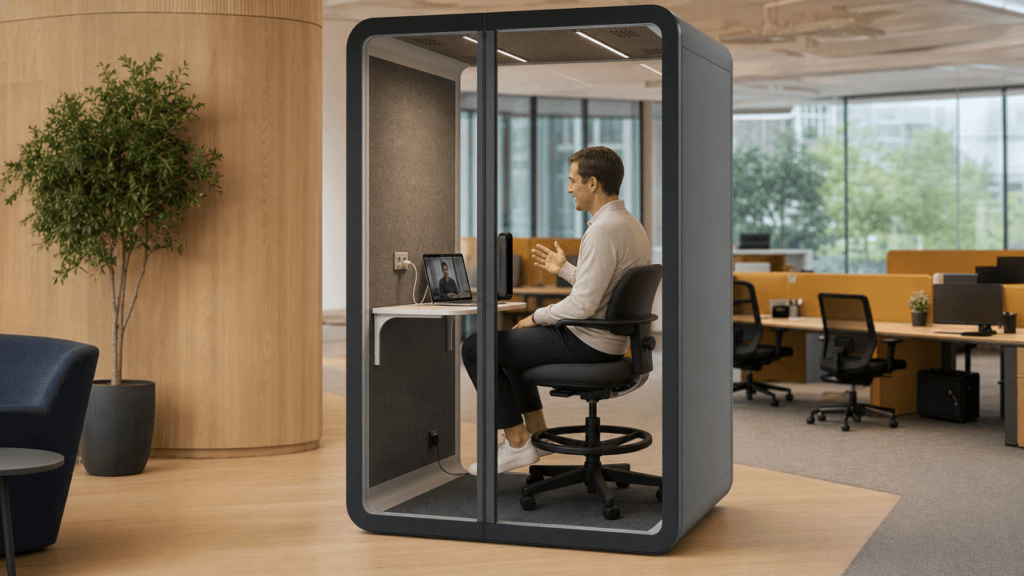
“Zoom pod” is a workplace search term for a pod arranged for Zoom or other video meetings. It does not mean a product made or certified by Zoom. The physical pod provides an enclosed setting where a camera, display, microphone, lighting, power, and conversation can be planned, while the customer supplies the computer, meeting account, and network service.
For product comparison, the more precise category is a videoconferentie pod. The term describes the meeting use case; the right size and equipment still have to be confirmed for the project.
Choose the Pod Size by Meeting Use
Start with the meeting that needs an enclosed space most often. Then test the real furniture and equipment layout rather than choosing only from a headcount label.
| Zoom or hybrid use case | B&H starting size | What to verify before ordering |
|---|---|---|
| One-person Zoom call | S or M | Whether the user needs a compact call space or extra room for a larger desk, display, or documents |
| Two-person meeting | M | Two seats, camera framing, screen position, and enough room for both users to enter and leave comfortably |
| Four-person hybrid meeting | L | Camera coverage for all seats, table depth, shared-screen sightlines, and cable access |
| Six-person meeting | XL | Seating movement, larger-screen placement, ventilation, power distribution, and circulation around the pod |
These size labels are useful for an initial conversation with a supplier. They are not a substitute for the selected model’s drawings. For exact footprints and space-planning questions, use the Gids voor de grootte en afmetingen van vergaderpods and confirm the final exterior size, door clearance, service access, and internal layout in the quotation.
One-Person Zoom Calls: S or M
S is a sensible starting point when the call is primarily a solo activity and the user needs a compact footprint. M is the better starting point when the person needs more room for a desk, a larger display, documents, or longer sessions.
If the office only needs a private space for short individual calls, an office phone booth may be more space-efficient. Use a video conference pod when the same enclosed space must support two-person and small-team meeting scenarios.
Two-Person Meetings: M
M fits a two-person conversation when both participants need to sit, see the screen, and share the camera frame. Check whether the table, laptops, and charger cables leave a clear path to the door. A nominal two-person capacity is not enough if the actual meeting includes a large display, presentation materials, or a fixed camera.
Four-Person Hybrid Meetings: L
L is the B&H starting point for a four-person hybrid meeting. Confirm that the camera can capture every seat without forcing one participant into a corner, and check the screen sightline from the remote participant’s perspective. A compact layout may be appropriate for short huddles; a deeper layout can be more comfortable when people work with laptops or documents during the meeting.
Six-Person Meetings: XL
XL is the starting point for six people. At this size, the project needs more than a seat count: plan the display, table, door swing, power locations, cable routing, and movement around occupied seats. If six-person meetings are occasional, compare the cost and floor area with a flexible four-person pod and another meeting option.
Pre-Meeting Checks: Lighting, Power, and Network
Check the Lighting From the Camera’s Point of View
The correct question is not simply whether the pod has an LED light. Sit in the intended position, open the camera preview, and check the face and background together.
- The face should be visible without harsh shadows under the eyes or chin.
- A bright window, glass wall, or light-colored background should not leave the face underexposed.
- The light should not reflect directly into glasses, a display, a glossy table, or the pod glass.
- Brightness and color-temperature controls should be easy to use for different rooms, times of day, and meeting tasks.
- In a multi-person pod, check every seat rather than testing only the seat nearest the camera.
For a deeper procurement checklist, see the meeting pod lighting guide. The quotation should identify the lighting options for the exact model; do not assume that a setting or control available on one configuration is included on every pod.
Confirm That Power Is Close Enough to Use
Before installation, confirm where the pod connects to the building supply and where users will charge devices. Ask the supplier and installer to document:
- the location of internal AC outlets and USB charging points, if selected;
- the distance to the nearest wall or floor power source;
- whether charger cables can reach without crossing the entry path;
- which power components are included in the quoted configuration; and
- who is responsible for the final electrical connection at the site.
Power is a small detail that can interrupt a meeting when it is discovered too late. A nearby outlet and a clear cable path are more useful than a generic statement that the pod is “plug and play.”
Confirm RJ45/Ethernet When Wi-Fi Is Unstable
One of the most common questions in a Zoom pod purchase is whether the pod has a network interface. B&H procurement conversations flag unstable Wi-Fi as a practical video-quality risk, even when the camera and display are good. Confirm whether the selected configuration provides an RJ45/Ethernet pass-through or port, where it is located, and how the cable will connect to the building network.
An Ethernet port does not guarantee internet performance by itself. The site still needs a working switch, network service, suitable cable routing, and IT approval. Record those responsibilities in the installation plan rather than treating “Wi-Fi available” as a complete connectivity specification.
Zoom Meeting Pod Procurement Checklist
Use this checklist in an RFQ or internal project review.
| Item | Bevestig | Waarom dit belangrijk is |
|---|---|---|
| Capaciteit | Most common meeting size and occasional peak size | Prevents choosing a pod that fits a headcount but not the real workflow |
| Seating and table | Seat positions, table depth, laptop use, and door clearance | Determines whether people can work and move comfortably |
| Camera and display | Camera field of view, screen location, and sightlines from each seat | Keeps remote participants visible and included |
| Verlichting | Face illumination, glare, brightness control, and color-temperature options | Improves the camera image without creating reflections |
| Stroom | Internal outlets, USB options, wall connection, and cable reach | Lets users charge devices without creating a trip or access problem |
| Netwerk | RJ45/Ethernet option, cable path, switch connection, and IT owner | Reduces dependence on unstable Wi-Fi while keeping responsibility clear |
| Akoestiek | The required level of speech privacy and the test evidence for the quoted model | Avoids treating “soundproof” as an unlimited performance promise |
| Locatiegereedheid | Delivery route, floor condition, door access, ventilation clearance, and service space | Prevents an approved pod from failing at installation |
Product Fit and Practical Boundaries
A video conference pod improves the physical conditions around a call. A smart meeting room system adds the AV, network, ownership, and handover plan; the pod itself does not supply a Zoom account, guarantee a particular video resolution, or make an unreliable building network reliable. It also should not be described as completely soundproof; acoustic results depend on the test method, installation, surrounding construction, and site conditions.
For one-person calls, compare the space efficiency of an office phone booth with the extra desk, equipment, and comfort required by a larger pod. For two or more people, the Meeting Pods category is the more direct product path. Review the capacity, configuration, power, ventilation, and delivery requirements before requesting a project-specific quote.
FAQ
Is een Zoom-pod hetzelfde als een videoconferentiepod?
They describe the same use case in most workplace searches. “Zoom pod” is the shorter scenario term; “video conference pod” is the more precise product description. A pod is not automatically made or certified by Zoom, so confirm the hardware, network, and configuration required for your meetings.
Welk formaat is geschikt voor een hybride vergadering met vier personen?
Gebruik L als het B&H-uitgangspunt voor vier personen. Controleer de camerakadrering, zichtlijnen naar het scherm, tafeldiepte, stroomtoegang en de benodigde ruimte voor laptops of documenten voordat u de definitieve configuratie kiest.
Hebben videoconferentiepads een Ethernet-poort?
An RJ45/Ethernet interface may be available as part of a selected configuration, but it should be confirmed in the quotation. Ask where the port is located, how the cable will reach the building network, and whether the site’s IT team or installer owns the final connection.
What should we check before the first Zoom call?
Preview the camera from the normal seat, adjust the light so faces are clear without glare, confirm that users can reach power for charging, and test the network path. If Wi-Fi is unreliable, test the RJ45/Ethernet connection before the meeting rather than discovering the problem after participants join.
Can I use Wi-Fi instead of Ethernet?
Yes, when the site’s Wi-Fi is stable in the pod’s installed location. Ethernet is worth specifying when signal quality or congestion has caused call problems. The final choice should be made with the IT team after testing the actual room, not from the pod label alone.