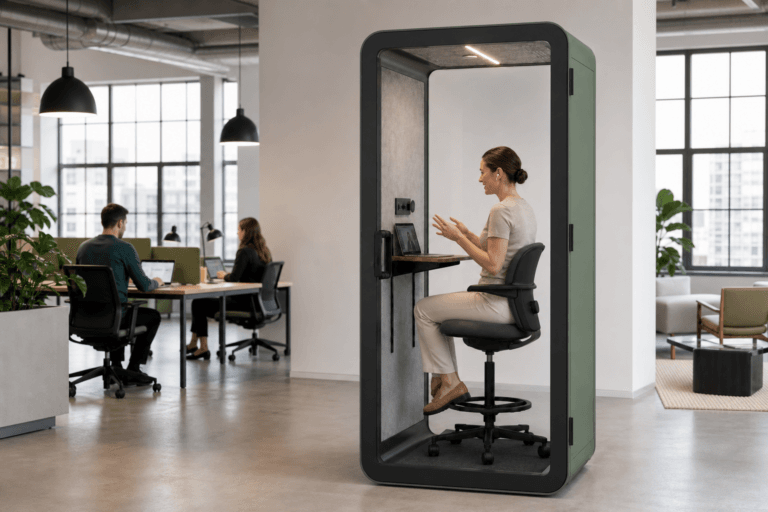
Quick Answer
A B&H Ergonomics phone booth with power includes an AC outlet, USB-A, and USB-C as standard. RJ45 is optional. The same pod model can be ordered with sockets selected for the destination market, while special requests such as a lower outlet or a different module position should be confirmed before production.
Last Updated: July 10, 2026 | Author: Richard | Estimated Reading Time: 7 minutes
What Is Included in a B&H Phone Booth Power Setup?
When buyers compare an office phone booth, power should be treated as a product configuration to confirm, not a simple yes-or-no feature. The useful questions are which connections come standard, which options need to be requested, and which socket should be selected for the destination market.
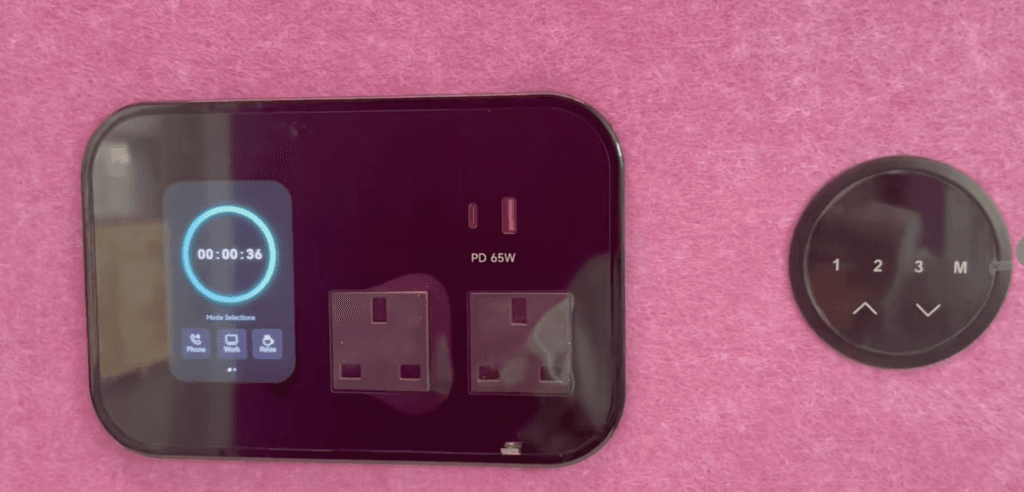
For B&H Ergonomics phone booths, the baseline is clear: an AC outlet, USB-A, and USB-C are standard. RJ45 is optional. USB-C output can vary by module, while the optional smart control panel includes 65W USB-C by default.
| Connection or Option | B&H Configuration | What the Buyer Should Confirm |
|---|---|---|
| AC outlet | Standard | Destination market and requested socket option |
| USB-A | Standard | Whether the standard module layout suits the project |
| USB-C | Standard | Required charging output, because wattage varies by module |
| RJ45 data port | Optional | Whether a wired data port is required inside the booth |
| Smart control panel | Optional | Whether the project needs the panel with its default 65W USB-C output |
| Special module position | By request and project review | Lower outlet position or another requested placement |
I would use this table as the starting point for an order specification. It separates standard B&H features from items that need a clear buyer decision.
Choose the Socket for the Destination Market
B&H Ergonomics supplies phone booths to multiple markets. The same pod model can be ordered with a socket option selected for the confirmed destination, including projects in the United States, the United Kingdom, and Australia.
This is an order-stage selection rather than a reason to create separate pod models for each market. The quotation or product specification should state the ship-to country so B&H can confirm the corresponding socket option.
| Project Destination | Specification Direction |
|---|---|
| United States | Confirm the U.S. socket option for the selected model |
| United Kingdom | Confirm the U.K. socket option for the selected model |
| Australia | Confirm the Australian socket option for the selected model |
| Other market | Ask B&H to confirm the available socket option before order approval |
Global buyers should also identify any company-specific preference. A distributor managing orders for several countries, for example, should list each destination separately instead of assuming that one module choice will suit every shipment.
Confirm USB-C Output When Laptop Charging Matters
USB-C describes the connector, but it does not tell the buyer the output of every module. Standard USB-C is included in B&H phone booths, yet there is no single wattage that applies to every available setup.
If users expect to charge laptops directly from USB-C, include that requirement in the specification. B&H’s optional smart control panel has 65W USB-C by default. A project using another module should confirm its output rather than assuming it matches the smart control panel.
The USB Power Delivery overview from USB-IF explains why compatible USB-C connections can support different power levels. For a booth order, the practical step is simple: name the devices users expect to charge and ask B&H to confirm the selected module.
Decide Whether Optional RJ45 Is Needed
RJ45 is not part of the standard B&H phone booth configuration. It is an option for projects that want a wired data port available inside the booth.
The buyer should state the RJ45 requirement early because it affects the selected module and its position. A useful request includes:
- whether RJ45 is needed;
- whether a data port is requested;
- where the user should access the port;
- whether RJ45 should share the main module or use another reviewed position.
Document Special Module Requests
Standard configurations cover many projects, but a small change in position can matter in daily use. Buyers may want an outlet in a lower position, an added RJ45 port, or another module placement that better suits their furniture and device layout.
Special requests should be documented before order approval. Useful examples include:
- adding optional RJ45;
- adding an outlet at a lower position;
- moving the power module to another reviewed location;
- selecting the optional smart control panel with 65W USB-C;
- choosing a particular socket option for the destination market.
Do not describe the requirement only as “custom power.” List the exact connection, quantity, position, and destination. That gives B&H enough information to review the request against the selected phone booth model.
Power and Data Confirmation Sheet
Facility managers, distributors, designers, and procurement teams can copy this sheet into an RFQ or specification discussion.
| Field | Buyer Entry | B&H Confirmation |
|---|---|---|
| Phone booth model | Selected model or size | Model and compatible module arrangement |
| Destination market | Ship-to country | Market socket option |
| Standard connections | AC outlet, USB-A, and USB-C | Included configuration for the selected model |
| USB-C expectation | Phone, tablet, or laptop charging need | Output of the selected module |
| Smart control panel | Required or not required | Optional panel and default 65W USB-C configuration |
| RJ45 | Required or not, plus preferred position | Optional RJ45 arrangement |
| Module position | Standard position or requested alternative | Position available for the selected model |
| Special request | Lower outlet or another clearly described change | Feasibility and final order specification |
Keep Power in Context
Power is one part of a phone booth decision. Buyers still need to compare size, acoustic privacy, ventilation, interior layout, and the way people will use the booth. The office phone booth buying guide covers that broader selection process.
For the power specification, keep the decision narrow. Confirm the destination market, standard connections, USB-C expectation, optional RJ45, and any special module position. The office phone booth design guide can help when module reach and work-surface layout are part of a wider design review.
Request a Configuration Review
When requesting a quote, send B&H Ergonomics the selected booth model, destination country, charging expectations, RJ45 requirement, and any requested outlet or module position. B&H can then confirm the product configuration before the order is approved.
FAQ
What power connections are standard in a B&H phone booth?
B&H Ergonomics phone booths include an AC outlet, USB-A, and USB-C as standard. The socket option is selected for the confirmed destination market. Buyers should still confirm the selected module and USB-C output for their project.
Is RJ45 included as standard?
No. RJ45 is optional. If a wired data port is required inside the booth, specify the preferred position before order approval so B&H can review the module arrangement.
Does the standard USB-C connection always provide 65W?
No. USB-C wattage is not fixed across every module. The optional B&H smart control panel includes 65W USB-C by default, but buyers using another module should confirm its output.
Can the same phone booth model use different market sockets?
The same pod model can be ordered with different market-specific socket options. B&H should be given the destination country so the appropriate option can be confirmed for that order.
Can I request a lower outlet or a different module position?
Yes, the request can be reviewed before production. State the desired connection, quantity, and position clearly. B&H will confirm what is available for the selected model before the order is approved.